
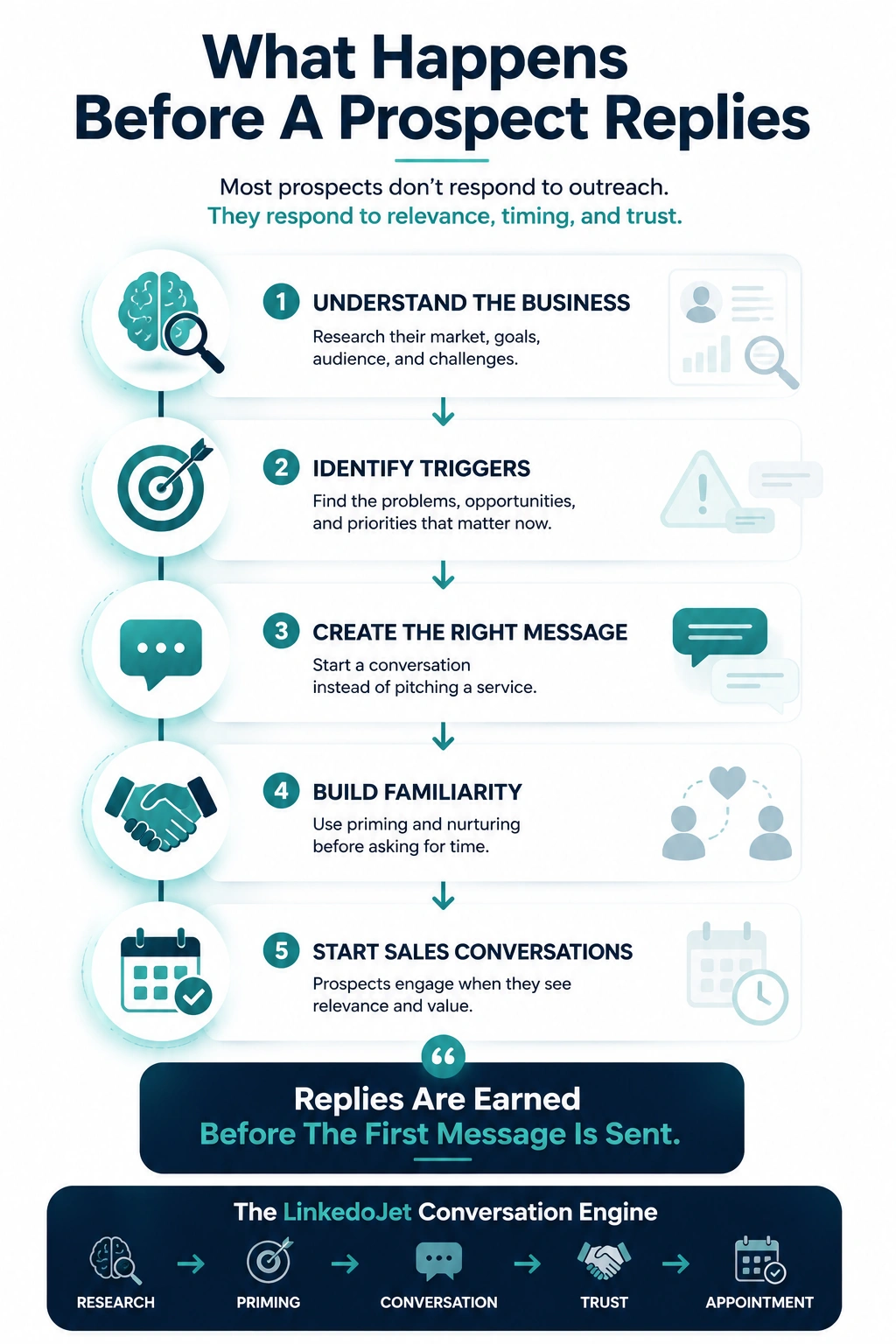
RevOps buyers don’t want a pitch. They want fewer “we don’t trust the numbers” meetings.
If your first message sounds like marketing, you’ll never get to the work you’re actually good at.
You already know the irony: you can walk into a messy CRM, find where the pipeline is lying, and make the forecast feel sane again.
But your own pipeline? It depends on timing, referrals, and whether a CRO happens to be in pain this week.
Meanwhile the exact leaders you’re built to help are stuck in the same loop: forecast call → pipeline inspection → argument about stage definitions → “why does SFDC say one thing and finance says another?” → a new dashboard that still doesn’t reconcile.
They’re not ignoring you because they don’t value RevOps. They’re ignoring you because their inbox is full of people creating work, not reducing risk.
If your first touch doesn’t read like it came from someone who has sat through a pipeline review where “Commit” means three different things, it doesn’t earn the right to exist.
Why your outreach gets ignored (and what that signals during a pipeline-review week)
RevOps leaders triage messages the same way they triage fire drills: Is this specific? Is it safe to answer? Will it save time or create a project?
Most consultant outbound fails the test immediately. Not because the copy is “bad.” Because the intent is obvious.
- “We optimize your revenue engine.” That reads like someone looking for a retainer, not someone who can diagnose stage-criteria drift or routing decay.
- Credential dumps. “Ex-Salesforce / helped 200 teams.” In a week where their forecast is off, that’s noise. They want a failure mode named cleanly.
- Fake stack familiarity. “Noticed you use Salesforce + Outreach…” when you can’t possibly know their field governance, object sprawl, or the real source-of-truth issue.
- First-touch meeting asks. “30 minutes this week?” reads like SDR behavior. Their calendar is wall-to-wall. You haven’t earned time yet.
- SDR urgency language. “Quick chat?” “Bumping this to the top.” It screams quota, not operator.
Here’s the hidden cost: each ignored message trains you to get louder (more volume, more “personalization”), when the real fix is different.
You need conversation architecture that stays in diagnosis mode until the call is the next logical step.
A 7-touch LinkedIn sequence that moves from peer hook → diagnosis → working session
Each touch has a job. No essays. No “tell me about your challenges.” Questions should be answerable without exposing their internal mess.
Touch 1: Connection request (no pitch, one credible hook)
Message: “{FirstName} — I work with B2B SaaS teams when forecast confidence starts slipping (usually stage criteria + stale opp hygiene). I’m comparing notes on what’s actually causing misses this year. Open to connecting?”
Touch 2: After acceptance (set the frame + one diagnostic question)
Message: “Appreciate the connect. Quick diagnostic Q: when forecast is ‘off’ for you, is it more often definition drift (stages/exit criteria) or behavior drift (updates + next steps + close plans)?”
Touch 3: Helpful follow-up (specific artifact, no meeting ask)
Message: “If it’s useful, I can paste a 10-point stage-exit checklist I use to spot where Commit is getting inflated (no deck, just bullets). Want it?”
Touch 4: Query-based pressure question (name the tension without drama)
Message: “When the CRO says ‘pipeline looks up but bookings don’t follow,’ do you usually find it’s opp-quality thinness… or lifecycle definitions causing false coverage?”
Touch 5: Insight-based nurture (contrarian check + permission)
Message: “One pattern I keep seeing: the ‘rep problem’ conversation turns into a definition + hygiene problem once you audit what “Next Step Date” and stage movement actually mean. Want the 3 checks I run first?”
Touch 6: Soft meeting request (15-minute sanity check, framed as working session)
Message: “If you’re open to it, I can do a 15-min pipeline/forecast sanity check. I’ll walk you through the quick diagnostic and you can steal it even if we never work together. Tue 11:30 or Thu 2:00?”
Touch 7: Close the loop (professional, keeps door open)
Message: “No worries if timing’s bad. I can paste the stage-exit checklist here, or I can circle back after your next forecasting cycle. Which is better?”
What to do with real replies (without turning it into a sales conversation)
When someone replies, your job is to keep the thread in diagnosis mode. Most consultants blow this by jumping to “great—can we chat?”
If they say: “We already have RevOps.”
Response: “Makes sense. I’m usually pulled in when internal RevOps is underwater for a quarter or when the CRO wants an outside view to settle definition fights. Quick one: where does it feel messiest right now—stage criteria, routing, lifecycle definitions, or pipeline hygiene?”
If they say: “Not a priority.”
Response: “Totally fair. This usually becomes priority after one of a few triggers: new CRO, tooling changes (SFDC/HubSpot), conversion drop, SDR ramp, or board pressure on forecast accuracy. Any of those happening this quarter, or is it genuinely stable?”
If they answer with specifics (“stages are a mess,” “forecast is political,” “routing is outdated”).
Response: “Helpful. Two quick checks so I don’t guess: (1) do you have written exit criteria per stage that reps actually follow, and (2) are you seeing stale opps clustering in one stage? If you answer those, I can tell you what I’d look at first.”
If they keep engaging, then you earn the 15-minute sanity check. Not because you asked for it—because it’s the fastest way to resolve the thread.
Signals you can verify—and how to turn each into a clean message angle
RevOps buyers can smell pretend personalization. Don’t imply you know their internal data quality. Use public signals and turn them into a narrow diagnostic.
| Signal you can see | What it often means operationally | Clean angle (one sentence + question) |
|---|---|---|
| New CRO / VP Sales hire | Stage definitions and forecast math get re-litigated fast | “New revenue leader usually triggers a stage/forecast reset—are you tightening exit criteria or focusing on pipeline hygiene first?” |
| Job posts mentioning forecasting, data hygiene, attribution | They’re feeling pain but may not have capacity | “Saw you’re hiring around forecasting/data hygiene—quick Q: is the pain more CRM adoption or definition mismatch across teams?” |
| SDR/AE headcount changes | Routing, handoffs, and lifecycle definitions get stressed | “Team ramp tends to expose routing + handoff leaks—are you seeing MQL-to-SQL friction or stage conversion weirdness?” |
| Public comments about pipeline inspection / QBRs | They’re in the ‘numbers don’t reconcile’ cycle | “When you inspect pipeline, is the biggest issue stale opps or thin opp quality hiding behind coverage?” |
| CRM change talk (HubSpot ↔ Salesforce) | Field sprawl, lifecycle confusion, reporting distrust | “CRM switches usually create definition fights—are you locking lifecycle/stage definitions before migrating reports?” |
Notice what’s missing: “Loved your post” and “saw you’re hiring.” That’s not a hook. That’s filler.
When to press, when to pivot, and when to close the loop
High-trust outbound means you don’t chase everyone who replies. You qualify like an operator—quietly, quickly, and without making them defend themselves.
Meeting-ready signals
- They answer with specifics: “our stages are a mess,” “forecast is political,” “routing is outdated,” “attribution is a fight.”
- They ask, “what do you usually look at first?”
- They mention an initiative: new fields, new lifecycle model, tool consolidation, board pressure on forecast.
Negative signals (don’t force it)
- “Not interested” with no detail.
- They point you to a generic inbox immediately.
- They engage once, then go dark through multiple touches.
How to pivot when it’s warm: stop pitching. Ask for scope.
Example: “If we did a 15-min sanity check, would you rather focus on (a) stage exit criteria + opp hygiene, (b) routing + handoffs, or (c) forecasting inputs and definitions? I’ll keep it to one.”
How to close cleanly when it’s not: protect your reputation.
Example: “Got it. I’ll close the loop. If it ever becomes relevant, I can paste the stage-exit checklist here—otherwise I’ll circle back after planning season.”
How LinkedoJet supports RevOps consultants (without turning you into spam)
Most “LinkedIn tools” help you send more messages. That’s not the bottleneck in this niche.
The bottleneck is running consistent, operator-grade conversations across multiple angles—forecast confidence, pipeline integrity, routing decay, lifecycle mismatch—while you’re busy doing delivery work.
LinkedoJet is built to run the outbound engine with you, not hand you a dashboard and wish you luck.
- ICP + targeting setup: we define your buyer set (CRO, VP Sales, Head of RevOps, Demand Gen) by stage, headcount, motion, and trigger signals—then turn it into clean filters.
- Sales Navigator + LinkedIn list building: we build and maintain prospect lists so you’re not prospecting at midnight.
- Multi-angle sequencing: we structure sequences like the 7-touch flow above, with variants for forecast, pipeline hygiene, handoffs, routing, and attribution.
- AI-assisted personalization: used to draft first-pass notes from verifiable signals (hiring, role changes, public posts), then tightened into messages that feel human and safe to answer.
- Outreach execution: connection requests + follow-ups go out on a schedule that matches when revenue leaders actually check LinkedIn (and without “spray and pray”).
- Reply handling + nurturing: we help classify replies (“already have RevOps,” “not now,” “tell me more,” specific pain) and keep the thread in diagnosis mode.
- Warm lead tracking + appointment support: we track engaged leads, prompt the right next touch, and support the handoff into booked working sessions.
- Campaign visibility + refinement: dashboards show what’s working by angle and persona, and we tune targeting + messaging as patterns show up.
Result: you stop relying on luck and referrals to hit your number. You run a repeatable conversation system that earns replies from skeptical operators.
FAQ
What’s a good LinkedIn connection request message for a RevOps consultant that doesn’t sound like lead gen?
Keep it peer-to-peer and narrow. Anchor on an ops theme (stage criteria drift, stale opp cleanup, routing decay) and ask to connect to compare notes. No compliments, no services list, no meeting ask.
How many follow-ups should a RevOps consultant send before asking for a call?
Plan for 6–7 touches total, with the meeting ask around touch 6 after you’ve earned at least one binary reply (“depends,” “mostly definitions,” “we’re seeing stale opps”). If you ask for time on touch 1–2, you’ll read like an SDR.
What should I personalize for CROs vs VPs of Sales vs Heads of RevOps in LinkedIn outreach?
CRO: forecast confidence, pipeline coverage vs quality, why bookings aren’t following pipeline. VP Sales: stage movement integrity, rep behavior, inspection hygiene, close plans. Head of RevOps: definitions, routing, lifecycle model, CRM adoption, reporting trust. Personalize from public signals, then ask a safe diagnostic question.
How do I ask for a discovery call without sounding like an SDR or pushing a meeting too early?
Offer a 15-minute sanity check on one area (stages, routing, lifecycle definitions, forecast inputs). Make it explicit they can steal the framework even if they never hire you. Give two time windows. Keep it calm.
What do I do when a prospect replies, “We already have RevOps” or “Not interested”?
Don’t argue. With “already have RevOps,” acknowledge it and ask where it’s messiest (definitions, routing, hygiene). With “not interested,” close cleanly and offer a lightweight artifact (paste a checklist) or a timing-based circle back after planning season.
Book a working session—and walk away with a deployable LinkedIn sequence
Not a “discovery call.” A practical build session where we map your buyer angles, write the first sequence, and show you how LinkedoJet runs it end-to-end.
If you’re tired of sounding like every other ops/growth consultant in a CRO’s inbox, this is where we fix the conversation architecture.
In this session, we’ll:
- Confirm your ICP and targeting rules (titles, SaaS stage, motion, headcount signals) and translate them into Sales Navigator filters.
- Build a prospect list that’s actually reachable on LinkedIn (not a fantasy TAM), with segments for CRO vs VP Sales vs Head of RevOps.
- Draft a 7-touch sequence with 2–3 angles (forecast confidence, pipeline hygiene, routing/handoffs) so you’re not stuck with one message that has to fit everyone.
- Set up reply-intent handling so “we already have RevOps” and “not now” don’t kill the thread—and engaged replies move naturally toward a 15-minute sanity check.
What LinkedoJet provides operationally after onboarding: we handle ICP and targeting setup, build and maintain Sales Navigator/LinkedIn prospect lists, write and run outreach workflows with AI-assisted personalization, manage follow-up and nurturing, track warm leads and booked working sessions, and give you visibility through dashboards—then refine the campaign as we see what’s landing.
This isn’t ordinary LinkedIn automation. The point isn’t sending more messages. The point is running consistent operator-to-operator conversations that produce replies you can actually work.
From identifying the right decision-makers to starting meaningful conversations and turning them into qualified appointments... LinkedoJet manages the entire outbound engine for your business.
Next step: stop guessing, start booking operator-grade conversations
You’ll leave with targeting rules, a ready-to-run sequence, and a clear workflow for replies → nurturing → booked sanity-check sessions.