
The inbox problem MSPs can’t out-muscle
If your first message sounds like “IT support + cybersecurity + 15 minutes?”, you’re done before you start.
Most MSPs aren’t losing on offer. They’re losing on first impression.
Your buyer’s LinkedIn inbox is a landfill of the same pitch: “We handle IT and security.” “We reduce risk.” “Can we grab 15 minutes this week?” It’s not that your prospect hates MSPs. It’s that they’ve been burned by churny providers, tool-first promises, and “24/7 support” that turns into a ticket backlog and surprise invoices.
And LinkedIn doesn’t reward volume anymore. The moment you look like a blast tool, you get ignored, reported, or mentally blacklisted. Not just you—your brand and your name inside that local market.
Here’s the hard part: MSP buying rarely starts with “we need a new provider.” It starts with timing. A restore test nobody wants to run. Conditional Access drift after three hires and a termination. An audit window. A cyber insurance evidence request. The IT manager going on PTO with no after-hours coverage they trust.
If your message forces them to decide too early—“do we want a meeting with a stranger?”—they’ll protect themselves and say nothing.
The play is calmer: earn a reply first with an operational question that’s safe to answer, then earn the appointment when readiness shows.
Who you’re really messaging (and why the talk track changes)
Same account, different fears. If you talk to everyone like they’re the CEO, you’ll get ghosted by the people who actually own the work.
MSP outreach breaks when you treat “the decision-maker” like a single person. In SMB and mid-market, the decision is a small political system.
| Persona | What they’re protecting | What earns a reply | What triggers shutdown |
|---|---|---|---|
| CEO / COO | Downtime, productivity, accountability. “I don’t want to be surprised.” | Operational risk framed in plain business language: recovery confidence, outage ownership, coverage gaps. | Tool lists, acronyms, anything that smells like a technical pitch. |
| CFO | Predictable spend, vendor sprawl, surprise invoices, renewal creep. | Clean cost logic: overlap, renewal timing, what’s included vs “projects,” evidence for insurance without a scramble. | Generic fear. “Cyber threats are rising.” They’ve heard it. |
| IT Manager / Director | Credibility. Ticket load. After-hours pages. Inherited messes they didn’t create. | Language that respects co-managed reality: coverage, escalations, patch windows, onboarding spikes, documentation, evidence readiness. | Anything that sounds like “replace you” or “take over your environment.” |
Co-managed is where most messaging dies. The IT leader reads your message as: “This person is trying to make me look incompetent.” Even if the CEO is curious, internal IT can quietly kill the deal if your tone is a threat.
So your talk track needs to signal one thing fast: you’re not here to embarrass anyone. You’re here to reduce after-hours pain, close coverage gaps, and provide a second set of eyes.
The 7-message LinkedIn sequence that books MSP appointments
Short. Situational. Calm. Every message has one job: move the conversation forward without forcing a “yes” too early.
These examples are intentionally plain. No “thought leadership.” No stack dumping. Just operator language that matches how IT decisions really happen.
1) Connection request (no pitch)
CEO/COO: “We work with a few 50–200 seat teams locally—mostly on keeping outages from turning into all-hands fire drills. Not selling you anything here. Open to connecting?”
IT Manager/Director: “Quick connect—always interested in how IT teams are handling after-hours coverage + escalation when headcount is tight. Not a pitch.”
Why it works: it gives a legitimate reason and removes the pressure. You’re not asking for time. You’re asking for permission to exist.
2) First message after acceptance (context + one crisp question)
CEO/COO: “Quick question—when was the last time you did a real restore test (not just ‘backup succeeded’), and did it actually meet the business RTO you expect?”
CFO: “Do you have a clean view of what’s ‘included’ vs ‘project’ in your IT/security spend, or does it drift into surprise invoices around renewals?”
IT Manager/Director: “Are you seeing Conditional Access drift in M365 after staff changes (new devices, old exceptions, weird MFA prompts), or do you have a tight process for cleaning it up?”
Why it works: it’s answerable in one line. It doesn’t require admitting failure. And it’s about an operational reality, not your services.
3) Soft follow-up (helpful reframing)
“Totally get it if you’re heads-down. The pattern we see: teams don’t find out they have a gap until a restore fails, insurance asks for evidence, or a renewal hits. Is restore testing owned by IT, or is it something you expect your provider to prove quarterly?”
Why it works: you’re not nagging. You’re giving them language to think with—and a narrower question.
4) Query-based pressure (professional, not hype)
IT Manager/Director: “Not trying to be dramatic—just curious: if you got hit with an ‘evidence request’ tomorrow (MFA, admin access, backups, endpoint coverage), who would do the pulling and who signs off?”
CFO: “When insurance renews or a client asks for a security questionnaire, does it turn into a scramble across vendors, or is it pretty clean?”
Why it works: it triggers the real fear—being the person responsible when it goes sideways—without using scare lines.
5) Insight-based nurture (something they can steal)
“When we review environments like yours, the issues usually hide in three places:
- Backups that ‘run’ but haven’t been restored recently
- Identity sprawl (old admin accounts, exceptions, device drift)
- Coverage gaps when internal IT is out / after-hours escalations
Anything in that list on your radar this quarter?”
Why it works: it sounds like you’ve seen the movie. It builds credibility without a PDF dump.
6) Soft meeting request (scoped, low-risk)
“If it’s useful, happy to do a 12–15 minute sanity check. Not a ‘switch MSP’ conversation—more like a second set of eyes on one area (restore testing, M365 access hygiene, or after-hours coverage). If it’s a fit, great. If not, you’ll still leave with a clean benchmark. Are you open next Tue 11:30 or Thu 2:00?”
Why it works: it’s safe even if they already have a provider or internal IT. The scope is tight and the exit is clear.
7) Final close-loop (protect brand, keep timing)
“I’ll close the loop for now so I’m not adding noise. If timing changes around renewals, an audit window, an acquisition/onboarding spike, or you just want a second opinion on coverage gaps, I’m easy to reach. Also—if I’m messaging the wrong person, who owns this on your side?”
Why it works: you protect your name in their inbox and give them an easy handoff path.
Timing, cadence, and triggers MSP buyers actually respond to
You’re not “following up.” You’re showing up when it’s plausible that this is relevant.
Most MSP sequences fail because they treat time like a calendar problem. For your buyer, time is a stress problem. Monday morning is tickets, fires, vendor pings. Friday is catch-up and fatigue.
Cadence that tends to feel human (not spammy):
- Day 0: Connection request
- Day 1: Message #2 (one question)
- Day 3–4: Message #3 (reframe + narrower question)
- Day 7: Message #4 (ownership/evidence question)
- Day 12–14: Message #5 (3-point insight)
- Day 18–21: Message #6 (scoped ask)
- Day 28–35: Message #7 (close-loop)
When they actually notice messages: early morning before the first fire drill, mid-day between meetings/context switching, and late afternoon when they’re clearing notifications. IT leaders often skim between calls; execs stop only when relevance is immediate.
Triggers that create real reply rates for MSPs:
- Renewals: IT provider renewal, cyber insurance renewal, M365 renewals, backup licensing true-ups
- Evidence moments: insurance controls, client/vendor questionnaires, audits, SOC/ISO pressure
- Change events: acquisitions, new locations, onboarding waves, key IT staff changes
- Coverage gaps: after-hours escalation pain, PTO coverage, “single-threaded” internal IT
The move is simple: write your messaging so it can honestly attach to one of these moments. If it can’t, it’ll read like a pitch even if your words are polite.
A blunt internal review: what MSP outreach gets wrong
These are the patterns that train good buyers to ignore you.
1) The tool dump. Listing RMM/EDR/MDR/M365/backup stacks is not credibility. To an exec it’s noise; to an IT leader it’s a trap (“this person is going to second-guess my architecture”).
2) Fake personalization. “Saw your profile” is a tell. If you don’t have a real reason for reaching out (role, size, locality, a specific operational topic), don’t pretend.
3) The takeover frame. “Replace your MSP” is not how most deals start anymore. Co-managed is common. Internal IT has gravity. Your language should offer relief, not displacement.
4) Asking for the meeting before you’ve earned a reply. A meeting is risk. A one-line answer to a practical question is not. Design for the smaller commitment first.
5) Generic fear lines. If your message could be sent to a dentist office, a manufacturer, and a law firm with no changes, it won’t land with an MSP buyer. They live in specifics: restore tests, patch windows, endpoint coverage, admin accounts, evidence requests.
6) “Send info” as a dead end. If your system’s response is to blast a PDF, you’re training the prospect to stop engaging. “Send info” is usually a request for less risk, not more content.
Objection handling that keeps the door open (without begging)
Acknowledge. De-risk. Narrow the scope. Offer a low-friction next step.
When MSP prospects object fast, it’s rarely personal. It’s self-protection. Your job is to keep the conversation alive without forcing a decision.
“We already have an MSP.”
“Makes sense—most teams do. I’m not trying to displace anyone over LinkedIn. Quick question: do you feel confident in restore testing + access hygiene, or is it more ‘we assume it’s covered’? If it helps, I can share the 3 checks we use to spot coverage gaps without turning it into a vendor swap.”
“We have internal IT.”
“That’s usually the best setup. The only reason I’m reaching out is co-managed support tends to work when internal IT wants fewer after-hours escalations and cleaner documentation. Is your team covered for PTO/after-hours escalation, or does it land on one or two people?”
“We’re under contract.”
“Understood. I’m not asking you to change anything mid-term. Is renewal in Q3/Q4, or further out? If you tell me the month, I’ll circle back with one specific benchmark question around coverage gaps so it’s useful timing-wise.”
“Send info.”
“Happy to—but rather than dumping a brochure, what would make it relevant? Are you more focused on (1) co-managed escalation coverage, (2) security/compliance evidence readiness, or (3) backup/DR confidence? I’ll send a one-page checklist for that area and you can tell me if it matches your current setup.”
The goal isn’t to win an argument. It’s to earn a second exchange. That second exchange is where real qualification starts: stakeholder, timing, trigger, and whether they’re open to a scoped sanity check.
FAQ
What’s a good LinkedIn messaging sequence for MSPs that already know prospects have an IT provider?
Assume they have a provider and write like you’re offering a second set of eyes, not a replacement. Start with a single operational question (restore testing, M365 access drift, after-hours coverage), follow with a narrow reframe, then nurture with a short 3-point insight. Only ask for a call after you get any signal of curiosity or pain.
The fastest way to lose is pretending they’re shopping. The fastest way to win is making it safe to reply while they’re “fine for now.”
How do you message an IT Manager/Director without triggering the “you’re trying to replace me” defense?
Use co-managed language from the start: escalation coverage, project help, documentation clean-up, evidence readiness, patch windows—things that make their life easier and protect their credibility.
Avoid tool talk and avoid “we can take over.” A good test: could they forward your message to their COO and say, “This might help us,” without feeling exposed?
What should an MSP ask in the first LinkedIn message to get a reply (not a meeting)?
Ask something easy to answer and hard to ignore, tied to a real trigger:
- “When was the last real restore test—and did it hit your RTO?”
- “Do you have Conditional Access/MFA drift under control after staff changes?”
- “If insurance asked for evidence tomorrow, who owns pulling it?”
One question. No pitch. The reply is the win.
How many follow-ups is too many on LinkedIn for MSP outreach, and what cadence works best?
If your messages are short and situational, 5–7 touches over 4–6 weeks is usually reasonable. If your messages feel salesy, even 2 touches is too many.
Aim for Day 1, Day 3–4, Day 7, Day 12–14, Day 18–21, then a polite close-loop around Day 28–35. Avoid Monday mornings and late Friday unless your audience is unusually active then.
How do you handle “Send info” without dumping a PDF and losing the thread?
“Send info” is a request to reduce risk. Respond with a forked question that lets them choose relevance (co-managed coverage vs evidence readiness vs backup/DR), then send a one-page checklist and ask a single follow-up: “Does this match how you run it today?”
Keep the thread alive. Content is only useful if it earns the next reply.
If you want this to run like a system (not a burst of effort)
We build and operate the MSP-specific targeting, messaging, follow-up, and appointment flow—so your calendar isn’t dependent on referrals or random timing.
LinkedoJet isn’t a Chrome extension that spams connection requests. It’s an outbound operating layer built for real conversations—especially in markets like MSP where inbox trust is gone.
On the call, we’ll pressure-test your current approach against how MSP deals are actually won (co-managed politics, contract timing, evidence triggers, stakeholder mix). But the value isn’t the call. It’s what we put in place after.
After onboarding, LinkedoJet operationally provides:
- ICP and targeting setup: we define the right decision-maker mix per account (CEO/COO, CFO, IT leadership, and when security is a factor) and the “don’t-touch” filters that keep you out of low-fit conversations.
- Sales Navigator + LinkedIn prospect list building: we build and maintain clean lists you can actually sell into—segmented by persona, company size, and service-fit (fully managed, co-managed, security add-ons, compliance support).
- AI-assisted personalization: we use AI to draft context lines and relevance hooks, then constrain it with operator rules so it doesn’t produce creepy or fluffy personalization. The goal is simple: sound like a person who understands their environment.
- Outreach execution: connection requests and message sequences are sent with controlled volume and cadence designed to protect your domain reputation and your name in-market.
- Lead reply handling and nurturing: replies get sorted by intent (curious, brush-off, under contract, “send info,” wrong person). Each path has a next message designed to keep the door open and move toward a scoped conversation.
- Warm lead tracking + appointment generation support: warm threads are tracked so they don’t disappear in someone’s inbox. When readiness shows, we help convert the thread into a qualified discovery call with the right stakeholder.
- Campaign visibility: dashboards show what’s being sent, who’s replying, what objections are coming back, and where conversations are stalling.
- Ongoing refinement: we adjust talk tracks by persona, test new triggers (renewals, audits, onboarding spikes), and tighten the sequence based on real reply data.
You’ll walk away with a working outreach engine: targeting that matches your service mix, sequences that don’t sound like every other MSP, and a follow-up system that turns “not now” into “revisit at renewal.”
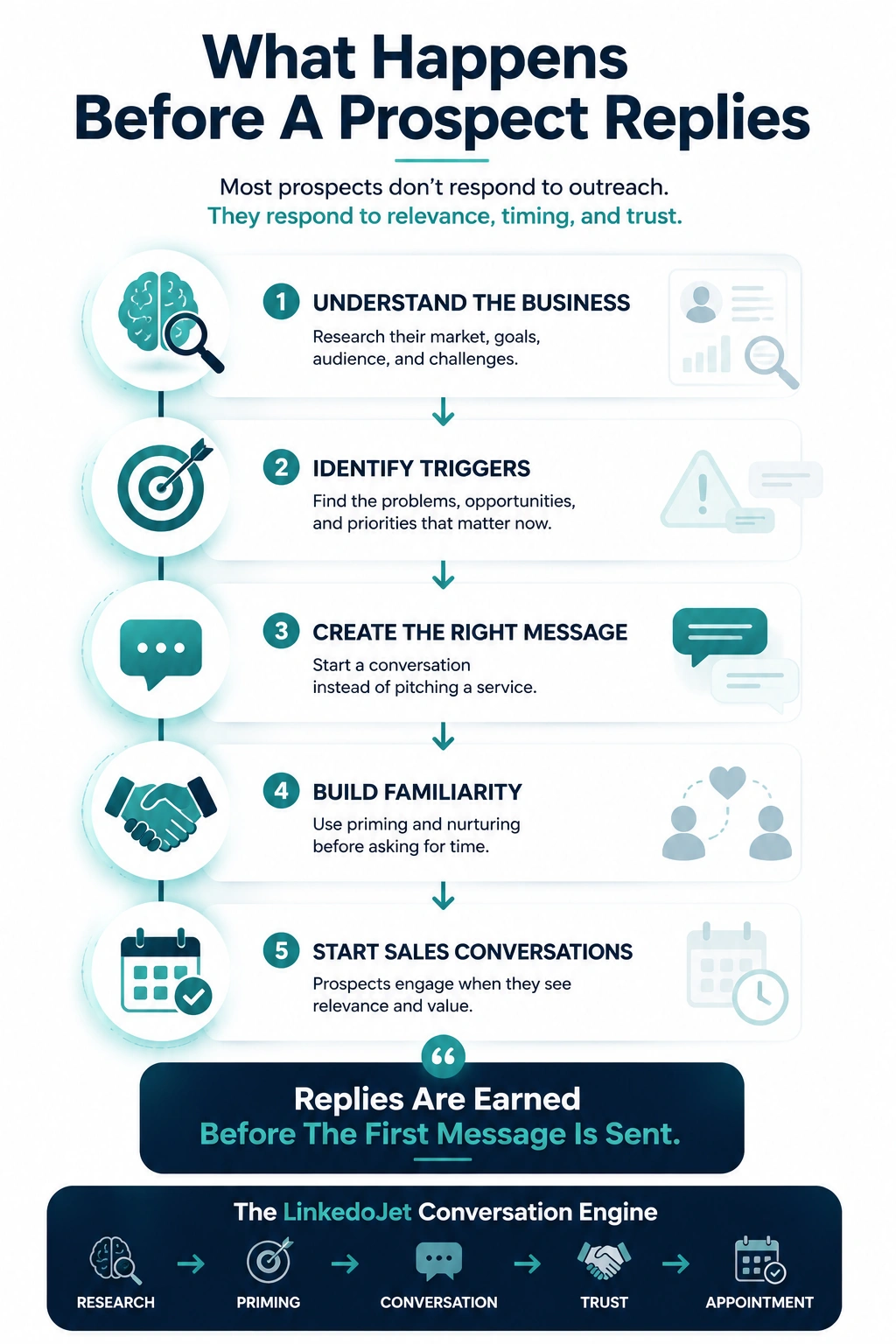
From identifying the right decision-makers to starting meaningful conversations and turning them into qualified appointments... LinkedoJet manages the entire outbound engine for your business.
Next step: get the MSP sequence built and running
If you’re done sounding like the 50 other MSPs in their inbox, the fix isn’t more volume—it’s a conversation system that earns replies and converts them at the right moment.
We’ll set up targeting, build persona-based sequences, run the outreach, handle nurturing paths, and track warm leads so booked calls aren’t luck.