
Why HR leaders ignore your LinkedIn outreach (and why it’s not “the template”)
If your messages read like a demo request aimed at one buyer, you’ll keep getting silence in a category where silence is a defense mechanism.
HRMS deals aren’t bought the way your outreach is written.
On LinkedIn, your rep is usually talking to someone who has been burned by a “simple upgrade” that turned into three months of data cleanup, payroll anxiety, and managers ignoring the new workflow. They’re not excited. They’re trying not to be the person who causes the next internal mess.
Three forces shape what gets a reply:
- Vendor fatigue: HR and HRIS leaders are swimming in pitches. The second your message smells like “HR software,” their brain filters it out.
- Implementation risk: Even when the product is good, the project is scary—integrations, permissions, SSO, cutover timing, reporting continuity, adoption, and the reality that HRIS becomes the support desk for everything.
- Shared ownership: HR doesn’t own the decision alone anymore. HRIS, payroll, IT/security, sometimes finance, sometimes a consultant—each has veto power, and each hates different things.
So when you lead with “quick demo?” you’re asking them to spend political capital before they even know you understand their world.
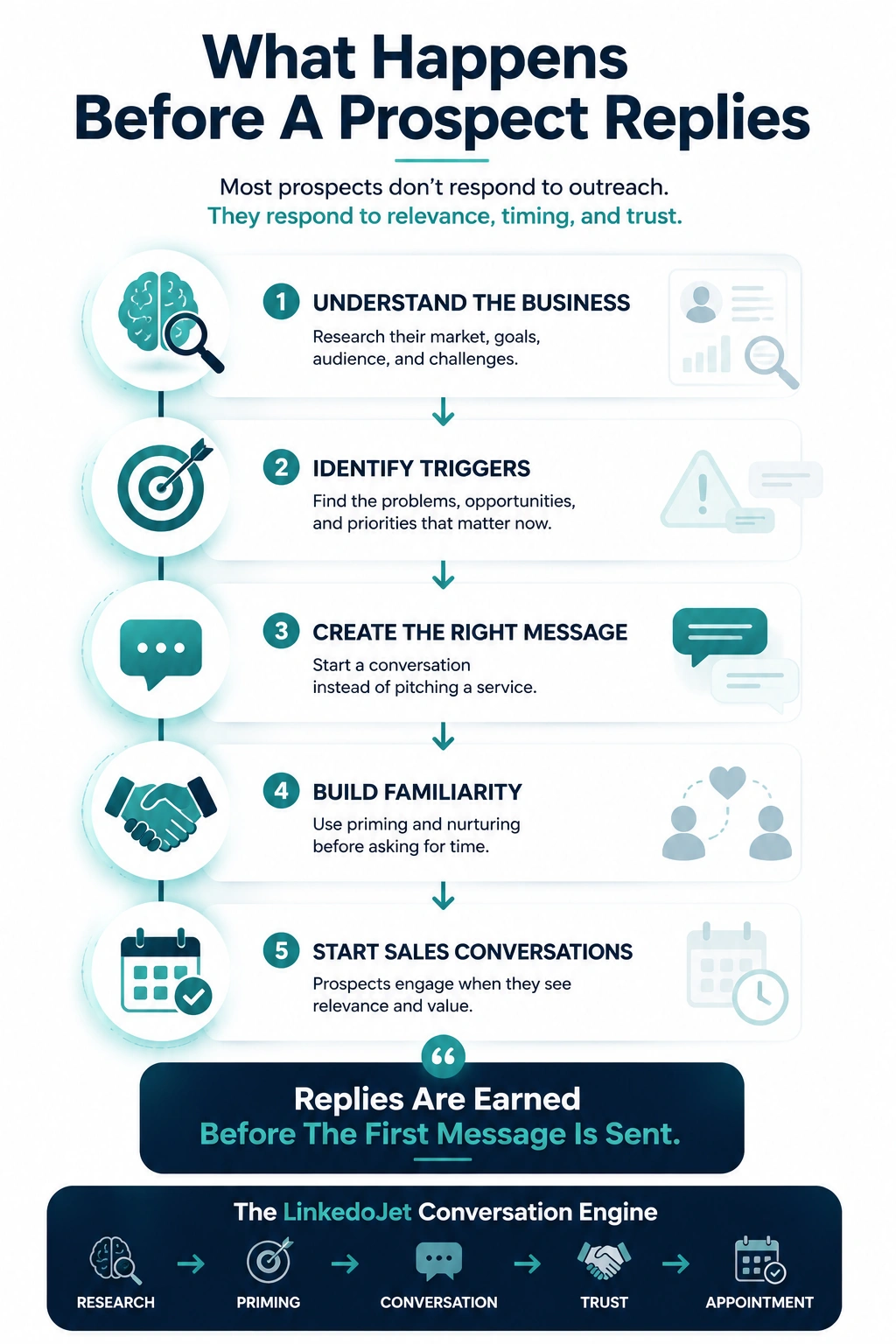
The fix isn’t louder outreach. It’s conversation design: earn a one-line reply, get a safe problem admission, then route the thread across the real owners without tripping the “demo-first” alarm.
Who you’re actually messaging in an HRMS deal
Same company, wildly different lenses. If you write one message for “HR,” you’ll sound wrong to everyone.
HR tech teams often assume the LinkedIn recipient is the buyer. In reality, you’re landing in the middle of a shared-responsibility triangle—and the person reading your message is thinking, “Will this become my problem?”
| Persona you hit on LinkedIn | What they care about | What they roll their eyes at | Angles that earn replies |
|---|---|---|---|
| VP People / Head of HR | Adoption, manager behavior, credibility with execs, not getting burned | Feature dumps, “employee experience” fluff, demo-first asks | Manager workflow completion, rollout risk, change fatigue, “what would you do differently next time?” |
| HR Ops / Talent Ops | Process throughput, onboarding strain, policy + workflow consistency | Vague “efficiency” claims, generic automation talk | Onboarding bottlenecks, approvals, handoffs, service delivery gaps |
| HRIS Manager | Data integrity, integrations, access control, tickets, reporting requests | “Loved your post” personalization, stack-guessing, long paragraphs | Duplicate entry across ATS/HRIS/payroll, integration sprawl, HRIS backlog, reporting living in spreadsheets |
| Payroll leader | Cutoffs, compliance, accuracy, avoiding fire drills | Anything that sounds like a risky change near payroll cycles | Downstream payroll risk, change windows, exception handling, audit readiness |
| CIO / IT Director (HR systems involved) | Security review, SSO/provisioning, vendor sprawl, architecture fit | “HR owns it” assumptions, underplaying IT effort | SSO/provisioning burden, data flow clarity, vendor consolidation, reducing shadow integrations |
| HR transformation consultant | Risk management, roadmap, stakeholder alignment | Hard sells that jeopardize trust | Implementation pitfalls checklist, stakeholder routing, governance model |
That’s why the sequence below doesn’t start with “here’s what we do.” It starts with a familiar operational mess and a question that’s easy to answer in one line.
The conversation engine: what each step is trying to earn
A good sequence isn’t seven messages. It’s seven small permissions.
HR buyers don’t “convert.” They allow.
They allow a reply. Then they allow a small admission (“yeah, reporting is a mess”). Then they allow you to share a useful pattern. Only after that do they allow calendar time—because now it’s not a sales call, it’s risk reduction.
| Step | What you’re earning | How it should feel to them | Signal you’re on track |
|---|---|---|---|
| Connection | Permission to exist | “Not another pitch” | Accept without a note |
| Message 1 | One-line reply | “Easy to answer” | Any answer, even brief |
| Message 2 | Problem admission | “You get the mess” | They name a workflow or constraint |
| Message 3 | Implementation reality | “You’re not minimizing risk” | They mention data, integrations, adoption, timing |
| Message 4 | Credibility in-thread | “Useful without a trap” | They ask a follow-up or accept the asset |
| Message 5 | Working-session call | “Low pressure, high relevance” | They propose time or ask who else should join |
| Message 6 | Routing across owners | “You respect shared ownership” | They point you to HRIS/IT/Payroll |
A complete 7-touch LinkedIn sequence for HRMS appointment generation
Short, human, and built for vendor fatigue. Copy, paste, and adapt by persona.
How to use this: pick one primary angle per account (reporting pain, integration sprawl, HRIS backlog, manager workflow completion, open enrollment load, payroll risk). Don’t mix five angles in one thread.
Touch 1 — Connection request (no pitch)
Goal: get accepted without triggering the “demo inbound” reflex.
Example:
“Hi [Name] — quick connect? I’m seeing a lot of teams dealing with HRIS consolidation + reporting requests living in spreadsheets. Not selling anything in the invite — just want to swap notes with people in the middle of it.”
Touch 2 — First message after acceptance (conversation starter)
Goal: earn a one-line reply.
Example (HRIS):
“Quick question — where do reporting requests usually bottleneck for you right now: data cleanup, integrations, or just getting consistent fields across systems?”
Example (VP People):
“Curious — what’s harder at your org: getting managers to complete the workflow on time, or getting clean reporting out the other end?”
Touch 3 — Soft problem-based follow-up (no reply)
Goal: respectful nudge + either/or prompt.
Example:
“Totally get it if you’re buried. When HR teams tell me ‘our systems are fine,’ it’s usually because the pain is hiding downstream. If you had to pick, is it more integration sprawl or adoption/workflow completion that creates the most noise?”
Touch 4 — Query-based implementation risk message
Goal: surface implementation regret without drama.
Example:
“When teams switch or add HR systems, what’s usually the hardest part for you personally — data cleanup, integrations/SSO, or getting managers to actually use the new process?”
This question works because it lets them answer as a practitioner, not as a buyer.
Touch 5 — Insight-based nurturing (value in-thread)
Goal: prove you’re useful before you ask for time.
Example:
“One pattern I keep seeing at 200–5k employee orgs: the ‘reporting problem’ is really a governance problem. Fields drift between ATS/HRIS/payroll, HRIS becomes the ticket bottleneck, and leadership asks for headcount views that only exist in someone’s spreadsheet.
If it’s helpful, I can send a 1-page checklist we use to map: systems → owners → data flows → where the requests pile up. No meeting needed.”
Touch 6 — Soft meeting request (only after engagement)
Goal: a working session, not a demo.
Example:
“Makes sense. If you’re open to it, I’m happy to do a quick 15-min working session to compare notes on (a) what’s creating the most HRIS noise and (b) what tends to de-risk changes without blowing up payroll cycles. Not a product demo.
Would Tue 10:30a or Thu 2:00p work? If someone else owns this (HRIS/IT/Payroll), tell me who and I’ll route it cleanly.”
Touch 7 — Final close-loop message (protect goodwill)
Goal: keep the door open + get routing.
Example:
“I’ll close the loop here so I’m not adding to your inbox noise. If HR systems work isn’t on your plate right now, all good — should I be talking to HRIS, payroll, or IT for anything related to reporting/integrations and the ‘day-2’ support load?”
If they don’t respond after this, stop. The brand cost of “just one more follow-up” in HR is real.
What HR leaders ignore (and why)
They’re not ignoring you because they’re rude. They’re ignoring you because your message looks like risk.
- Leading with a meeting ask. “Quick demo?” translates to “I’m about to take an hour and then introduce procurement.”
- Pretending you know their stack. “Saw you’re on Workday” when you’re guessing destroys trust instantly.
- Buzzword soup. “Employee experience,” “digital transformation,” “future of work.” HR has heard it 1,000 times and still has a ticket backlog.
- Vague value props. “Save time” means nothing unless you name the workflow: onboarding handoffs, approvals, manager tasks, reporting, payroll exceptions.
- Ignoring shared ownership. If you only speak to HR outcomes and skip IT/security or payroll reality, you sound naïve.
- Long messages that read like email blasts. HR checks LinkedIn in short bursts: early morning, between calls, late afternoon. If it scrolls, it loses.
- Mistimed angles. Benefits/open enrollment talk out of season. Consolidation talk when renewals are far away. Analytics talk when nobody is asking for it.
The hard truth: your best product story won’t matter if your opening makes them feel like you’re about to create work.
Objections, redirects, and routing (keep the thread alive without pushing a demo)
The win isn’t “overcoming objections.” It’s staying credible while you narrow the problem.
“We already use Workday / UKG / BambooHR / ADP.”
Reply:
“Totally. Most teams I talk to aren’t looking to rip and replace. The question I’m trying to sanity-check is narrower: where does the pain still show up around the HRIS — reporting requests, manager completion, integrations, or HRIS ticket volume?”
“Send info.”
Reply:
“Happy to. Quick scoping question so I don’t send generic fluff: is your bigger headache right now (1) reporting/analytics, (2) integrations + access/SSO, or (3) adoption/workflow completion?”
“Not this quarter.”
Reply:
“Makes sense. What tends to trigger a revisit for you — renewal timing, open enrollment, acquisition/headcount growth, a compliance change, or a leadership push to consolidate tools?”
“We’re under contract / locked in.”
Reply:
“Got it. In that case I’d only be useful if there’s a day-2 problem you’re still carrying (reporting governance, integrations, HRIS support load, manager follow-through). If none of that is true, I’ll bow out.”
“Talk to IT / talk to HRIS / talk to payroll.”
Reply:
“Perfect — who’s the right person? I’ll keep it tight and focus on the part they actually own (SSO/provisioning for IT, cutoffs/compliance for payroll, workflows/data/tickets for HRIS).”
FAQs
What’s a good LinkedIn messaging strategy for HR tech companies selling into HRMS/HRIS?
Start with situational triggers, not product claims. HR and HRIS leaders reply when you name a familiar operational mess (reporting living in spreadsheets, duplicate entry across ATS/HRIS/payroll, HRIS ticket backlog, integration sprawl) and ask a one-line question. Then you earn the right to a short working session by showing you understand implementation risk and shared ownership across HRIS, payroll, and IT.
How long should a LinkedIn messaging sequence be for HR software buyers (HR, HRIS, Payroll, IT)?
Plan 6–8 touches over ~14–21 days, with the first 3 touches focused purely on earning a reply. HR personas often see LinkedIn in bursts; short, respectful nudges outperform long “checking in” paragraphs. If you get no engagement after a clean close-loop message, stop and move them into a light nurture tied to a real timing window (renewals, consolidation, open enrollment season, compliance change).
What should I say in a LinkedIn connection request to an HRIS Manager without sounding salesy?
Keep it simple, avoid stack-guessing, and reference a common HRIS reality without acting like you’ve done deep surveillance. Example: “Quick connect — seeing a lot of HRIS teams dealing with reporting requests + integration sprawl. Not selling anything in the invite; just interested in swapping notes.” If your invite contains a pitch, you’ll get ignored.
How do you handle “We already use Workday/UKG/BambooHR/ADP” without starting a vendor comparison?
Agree and narrow the scope. Most teams aren’t ripping out their HRIS; they’re trying to reduce downstream pain. Pivot to a specific problem that still exists even with a major platform: reporting governance, manager workflow completion, integration/SSO burden, HRIS ticket volume, payroll exceptions. Keep it grounded in their day-to-day, not a feature battle.
What’s the best time of day to message HR leaders on LinkedIn for replies (not just opens)?
Early morning before internal meetings start, short gaps around midday calls, and late afternoon after the day’s fires are contained. The bigger factor is message “effort”: if your first question can be answered in one line, you’ll get replies even when they’re busy. If it reads like an email, they’ll save it and never come back.
If you want, we’ll run this system for your HR tech team
Not software you babysit. A managed outbound engine built for HRMS deals where risk and shared ownership decide who replies.
When HR buyers ignore you, it’s rarely because your reps “need better hustle.” It’s because the messaging doesn’t match how HRMS decisions actually happen: multiple owners, high implementation risk, and extreme vendor fatigue.
LinkedoJet is how HR tech teams turn LinkedIn from random activity into a consistent appointment channel.
What we provide operationally:
- ICP + targeting setup: we help you define the exact personas that show up in HRMS deals (VP People, HR Ops, HRIS, payroll, IT, consultants) and the account filters that matter at 200–5,000 employees.
- Sales Navigator prospect list building: we build and maintain the lists—by role, seniority, geography, and the buying committee shape—so your team isn’t stuck prospecting in the dark.
- AI-assisted personalization: not fake “Loved your post” compliments. We generate tight, persona-aware openers tied to real triggers (reporting bottlenecks, integration sprawl, manager completion, HRIS backlog, renewal/consolidation windows).
- Outreach execution on LinkedIn: connection requests + messaging sequences are deployed consistently, with timing that fits how HR leaders actually check LinkedIn.
- Reply handling + nurturing: we categorize replies (curious, deflection, timing, routing) and keep threads moving with calm redirects that protect your brand and earn the next step without pushing demos too early.
- Warm lead tracking + appointment support: we track warm signals, route conversations to the right rep, and support the handoff into booked working sessions and qualified appointments.
- Campaign visibility: dashboards show what’s happening—accept rates, reply rates, warm lead volume, booked meetings, and which angles are producing real conversations.
- Ongoing refinement: we adjust personas, angles, and timing windows as you see what the market is responding to (and what it’s ignoring).
What happens after onboarding: you get a working outbound system—targeting, lists, message library by persona, sequencing rules, and a reply-handling playbook—then we run it with you week over week. Your team sees the exact conversations being started, which objections are showing up, and where appointments are coming from.
Why this is different from ordinary LinkedIn automation tools: tools send messages. LinkedoJet engineers the conversation, manages the workflow, and keeps leads warm until they’re ready—because HRMS deals aren’t won by blasting more invites. They’re won by respecting risk, routing across owners, and being useful in-thread.
Book a demo session and we’ll show you: the exact sequence we’d deploy for your ICP, the persona angles we’d start with, how we build lists in Sales Navigator, and how warm leads and appointments are tracked end-to-end.
Next step: get replies from the real HRMS buying committee
We’ll build the lists, write persona-specific sequences, run the outreach, handle replies, and help your team convert warm threads into working sessions and qualified appointments—without sounding like every other HR software pitch.
From identifying the right decision-makers to starting meaningful conversations and turning them into qualified appointments... LinkedoJet manages the entire outbound engine for your business.