
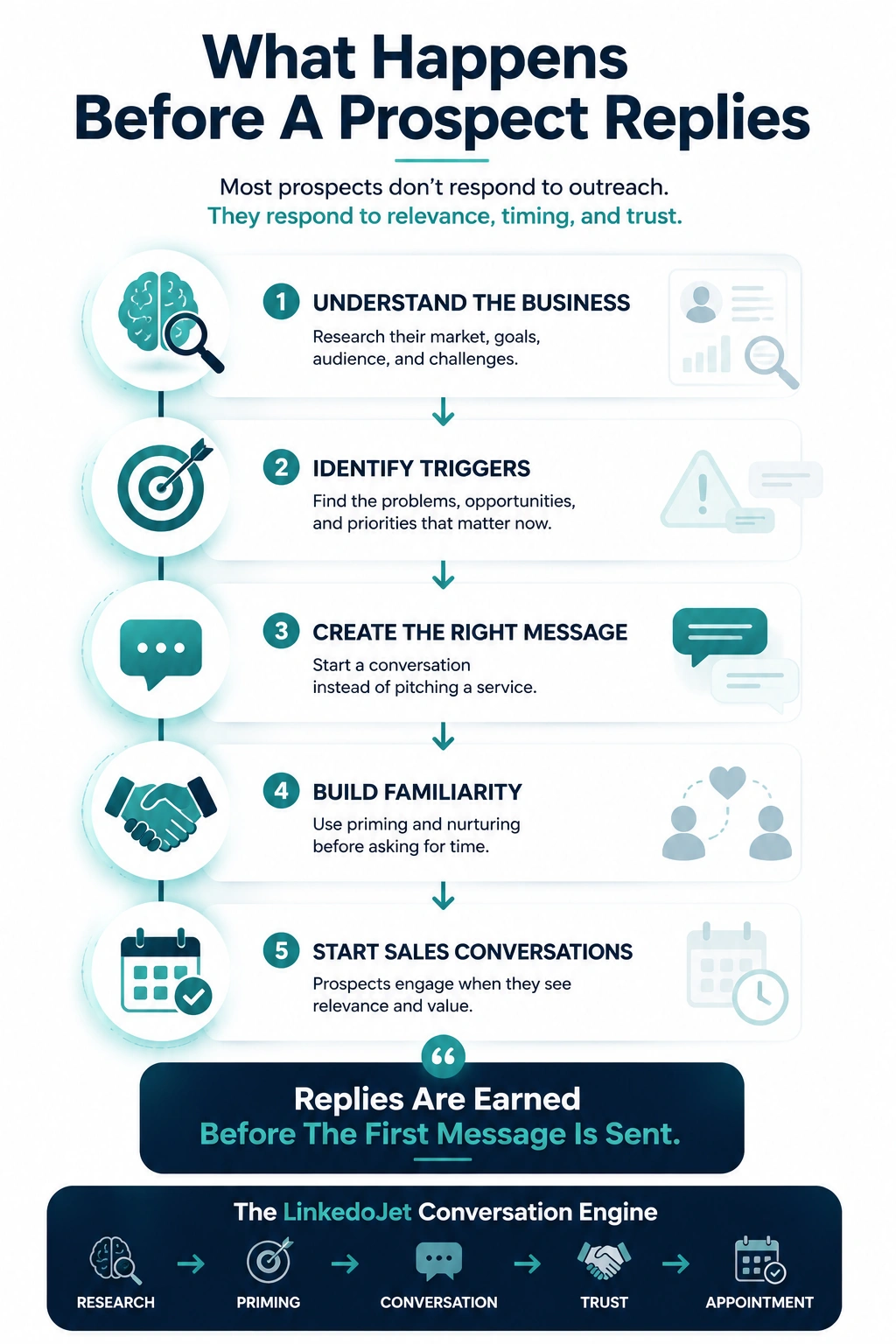
The real reason your LinkedIn outreach gets accepted—and then goes quiet
If you’re getting connections but not conversations, you’re not failing at effort. You’re failing at perceived safety.
A district leader can accept your request and still have zero intention of engaging. Accepting is low-risk. Replying isn’t.
Replying creates work: explaining context, exposing priorities, inviting follow-up, possibly triggering a procurement thread they don’t have bandwidth for. In K-12 and higher ed, that “work” lives on top of state testing windows, PD scheduling, staffing gaps, initiative fatigue, and the quiet fear of being the person who brought in a tool no one uses.
So they accept, they skim, and if your first message smells like demo-shaped pressure, the conversation dies before it starts.
The cost isn’t just a missed reply. It’s buying windows you don’t get back:
- You show up after the budget is spoken for and wonder why you’re hearing “check back next year.”
- You only thread one champion and the deal collapses when IT or procurement shows up late and hits the brakes.
- You train the account to treat your brand as noise—so even a genuinely useful note gets ignored.
This is why EdTech forecasting feels like a coin flip. Not because your product isn’t good. Because your outreach doesn’t match how education buyers protect time and reduce risk.
Message maps by buyer type (what to say, what to avoid)
One sequence for “education” is how you get parked with “send info.” Different stakeholders say yes to different risks.
| Persona | What they’re protecting | Openers that feel native | Language that triggers silence |
|---|---|---|---|
| Curriculum / Instruction | Teacher time, PD capacity, fidelity of use, initiative overload |
|
|
| CIO / IT Director | Security review load, SIS/LMS/SSO/rostering friction, support tickets, data risk |
|
|
| Procurement / Ops | Process integrity, paperwork, pricing predictability, board cycle, vendor compliance |
|
|
| Higher Ed (student success / retention) | Retention pressure, proof of impact, staff workload, advising capacity |
|
|
| Corporate L&D / HR | Adoption, manager buy-in, time-to-productivity, reporting, change management |
|
|
The EdTech sequence: connection → question → follow-up → nurture → soft ask → close-loop
Your first goal isn’t a meeting. It’s a real reply that tells you where they are in the cycle.
1) Connection request (tight, non-salesy)
Why it works: It doesn’t pretend you “love their profile.” It gives a credible reason and stays small.
Connection note example:
“Hi <
2) First message after acceptance (one-sentence, easy reply)
Why it works: It asks a question they can answer in 5 seconds, anchored in a real constraint.
Message:
“Quick question—when your team trials something new, what slows it down more: PD/time to train, or vendor review + data sharing paperwork?”
3) Follow-up that adds credibility (without escalating pressure)
Why it works: You’re not “bumping.” You’re offering a true observation and a second, better question.
Message:
“The pattern I keep seeing is pilots don’t fail on features—they fail on workflow + training time once the semester gets busy. Is adoption strain something you’re dealing with right now, or is this more of a planning/renewal season issue for you?”
4) Emotional trigger (safe, accurate, not dramatic)
Why it works: You name the political reality: nobody wants to sponsor a tool that creates teacher backlash or support load.
Message:
“This might be you: you’re trying to protect instructional time, but every ‘good idea’ comes with logins, training asks, and someone on the hook when adoption drops. If you had to pick one—what’s the bigger risk right now: adding one more tool, or not addressing the gap it’s meant to solve?”
5) Permission-based nurture (offer an artifact, only send on “yes”)
Why it works: You’re not sending a deck. You’re offering something they can reuse internally.
Message:
“I have a one-page ‘pilot success criteria’ checklist districts use so the pilot doesn’t turn into a graveyard. Want me to send it here?”
6) Soft meeting ask (working session, tight window, easy out)
Why it works: It ties to their calendar reality and positions the call as a practical swap, not a pitch.
Message:
“If you’re heading into evaluations/renewals soon, happy to swap notes for 12 minutes. I can share what’s been reducing adoption drop-off without adding more work for teachers. If it’s not the season, just tell me ‘summer’ or ‘August’ and I’ll pause.”
7) Close-loop (respectful, timing-aware)
Why it works: You protect their attention and keep the door open with a one-word reply.
Message:
“I’m going to step back so I’m not another notification during the school year. If you want me to circle back, reply with one word—‘testing’, ‘budget’, ‘summer’, or ‘not now’—and I’ll follow your timing.”
Objection handling that fits education reality
Most “objections” in EdTech are really timing signals or risk signals. Treat them that way and you keep the relationship warm.
“Send info.”
Translation: “I don’t want to be sold to, and I don’t want homework.”
Reply: “Totally fair—what would make it actually useful? I can send either (1) a one-page pilot success criteria checklist, or (2) a short vendor review question list (SSO/rostering/data sharing/accessibility). Which is closer to what you’re dealing with?”
“Not looking.”
Translation: “We’re overloaded” or “wrong window.”
Reply: “Makes sense. Are you more likely to revisit this around renewal, summer planning, or next budget cycle? If you tell me the month, I’ll disappear until then.”
“We already have something.”
Translation: “Switching cost and adoption risk are high.”
Reply: “That’s usually the right call unless the current tool is causing pain. What’s the honest issue—low adoption, reporting gaps, integration/support load, or just ‘too many tools’?”
“Talk to procurement/IT.”
Translation: “I don’t want to be the bottleneck, and I don’t want to bring you internal without a reason.”
Reply: “Happy to. Before I pull them in, what’s the quickest way to not create extra work—should I start by asking IT about SSO/rostering + data sharing agreement expectations, or is there a procurement intake form you prefer vendors use?”
Timing and cadence that respects education calendars
Education buyers check LinkedIn in short bursts. Your follow-up spacing should match when they can breathe.
If you treat districts like mid-market SaaS and run a tight 5-day chase, you’ll get silence and a bruised account. The rhythm is different. People are protecting classrooms, uptime, and process.
Practical cadence (that doesn’t burn the account)
- Day 0: Connection note (one sentence).
- Day 1–2: First question (two options, easy reply).
- Day 5–7: Credibility follow-up (one insight + one question).
- Day 12–16: Permission-based artifact offer (“Want me to send…?”).
- Day 21–28: Soft working-session ask (12 minutes, easy out).
- Then: Close-loop + pause until the month they gave you.
Seasonal adjustments your SDRs should actually make
- Back-to-school weeks: Shorter notes, fewer touches. Ask one question and then stop.
- Testing windows: Don’t “check in.” Offer a pause and a month-based follow-up.
- Budget/board cycle periods: Lead with timeline and process language (procurement path, approvals, vendor review).
- Summer planning: This is when “swap notes” converts—people can think.
The goal isn’t to be persistent. It’s to be remembered as the vendor who didn’t create extra work.
Why EdTech outreach gets ignored (and how to stop triggering silence)
Most messages fail before the buyer even finishes the first sentence—because the subtext is “I’m here to take time from you.”
Education leaders have been trained to filter vendors harder than almost anyone. Tool sprawl. Post-pandemic initiative fatigue. Privacy and accessibility scrutiny. Procurement burden. And long cycles where a single bad decision becomes a public headache.
So here’s what gets you muted, even if your product is strong:
- Outcome claims without implementation reality. “Raise achievement” is not a plan for PD, workflows, and fidelity of use.
- Surface-level personalization. “Saw you’re passionate about education” reads like you’re copying and pasting.
- Demo-shaped CTAs. Asking for 20 minutes before you’ve earned context is a fast way to get “send info.”
- Buzzwords that don’t sound like schools. If your note could be sent to a fintech CFO, it won’t land with a curriculum director.
- Ignoring the real blockers. Vendor review, data sharing agreements, FERPA/COPPA expectations, SSO/rostering, support load, accessibility, and timeline/board cycles.
- Single-threading. Winning a conversation with instruction and never earning trust with IT/procurement is how deals die in the gap.
The fix isn’t “better copy.” It’s conversation design: persona-specific openers, stakeholder sequencing, and permission-based nurturing that keeps you present without becoming noise.
LinkedoJet as the operating system for EdTech LinkedIn conversations
Not another automation tool. A managed outbound engine built for long, calendar-driven, multi-stakeholder sales.
Most teams buy a tool and then ask SDRs to “be more personal.” It doesn’t fix the real problem: you’re running outreach like a short-cycle SaaS motion in a market that punishes risk and rewards patience.
LinkedoJet is the system we use to run EdTech LinkedIn appointment-setting end to end:
- ICP and targeting setup: define buyer groups (district, higher ed, corporate L&D) and the stakeholder mix inside accounts.
- Sales Navigator + LinkedIn list building: curated prospect lists by role (curriculum, IT/CIO, procurement/ops, coaches, student success, HR/L&D) so you’re not guessing who matters.
- AI-assisted personalization: light, grounded context that sounds human—without “impressive profile” fluff and without manufacturing intimacy.
- Outreach execution: connection + message sequences that fit education tone and calendar spacing.
- Lead reply handling and nurturing: we categorize intent (curious, timing-off, blocker, handoff-to-IT/procurement) and run permission-based follow-ups instead of chasing.
- Warm lead tracking + appointment support: who engaged, what they said, what month to return, and who else to thread in the account before you ask for time.
- Campaign visibility: dashboards that show sequence performance, reply rates by persona, and where conversations stall (so you can fix the system, not blame the SDR).
- Ongoing refinement: adjust messaging based on seasonality (testing, budget, summer) and what stakeholders are actually responding to.
If you want LinkedIn to produce real district/campus conversations, the bar isn’t “more activity.” The bar is operational credibility at first touch—then patient follow-through until timing opens up.
FAQ
What’s a realistic LinkedIn messaging cadence for K-12 decision-makers during the school year?
Assume they’re checking LinkedIn in short bursts (early morning, between meetings, late afternoon). A sane cadence is: connect → 1 question → one credibility follow-up 5–7 days later → one permission-based artifact offer → one soft “swap notes” ask → then close-loop and pause.
During testing windows or back-to-school weeks, slow it down. The quickest way to lose the account is to act like silence is a personal challenge to overcome.
How should our messaging change for curriculum leaders vs CIO/IT vs procurement in the same district account?
Curriculum cares about adoption, PD time, and initiative overload. IT cares about security review load, integrations (SIS/LMS/SSO/rostering), and support tickets. Procurement cares about process, paperwork, pricing predictability, and board/budget timing.
Don’t “copy/paste and swap the job title.” Change the risk you’re reducing and the question you’re asking. In practice, that means different openers, different artifacts (pilot criteria vs vendor review questions), and different timing for when you pull each stakeholder in.
What do you say after “send info” without pushing a demo or getting parked?
Ask what kind of info would be useful, then offer two small artifacts they can actually use internally. Example: “I can send either a one-page pilot success criteria checklist or a short vendor review question list (SSO/rostering/data sharing/accessibility). Which would save you more time?”
If they pick one, send it and end with one question tied to timing: “Is this a this-semester issue, or more of a renewal/summer planning topic?”
How do we reference FERPA/COPPA, security review, SSO/rostering, and data sharing agreements without sounding alarmist?
Keep it process-oriented, not fear-oriented. You’re not implying danger—you’re showing you respect their workload. A simple line works: “Do you prefer vendors start with your security/data sharing checklist early, or only once instruction has interest?”
That framing signals maturity: you’re trying to follow their path and avoid creating extra work.
How do you book meetings in EdTech when timing is wrong today but the account could open up at renewal or planning season?
You don’t force a meeting. You earn a reply, capture the timing signal, and run a quiet nurture that’s useful: pilot criteria, rollout timeline outline, vendor review questions, “where adoption breaks.” Then you re-appear in the month they gave you with a tight working-session ask.
The close-loop message matters: “Reply with ‘August’ or ‘renewal’ and I’ll follow your timing.” It feels respectful—and it keeps you in the deal without constant pings.
See what your EdTech LinkedIn conversation engine looks like when it’s run like an operating system
This isn’t a generic “strategy call.” You’ll leave with a practical messaging sequence, a stakeholder map, and a clear plan for turning replies into qualified discovery calls—without the vendor vibe.
On the session, we’ll do three things:
- Pick your motion: district, higher ed, or corporate L&D—then identify the exact personas you need to thread (instruction, IT/CIO, procurement/ops, coaches, student success, HR/L&D).
- Build your conversation sequence: connection note, first question, follow-ups, permission-based nurture, soft meeting ask, and a timing-aware close-loop you can actually send during the school year.
- Define what “qualified” means: what a good reply looks like, what signals timing vs blocking, and how to turn “not now” into a scheduled re-entry around renewal or planning season.
After onboarding with LinkedoJet, we don’t hand you templates and wish you luck. We set up the targeting system, build your Sales Navigator/LinkedIn prospect lists, and run the outreach execution with AI-assisted personalization that stays grounded in education realities (adoption, PD time, vendor review, SIS/LMS/SSO/rostering).
When replies come in, we help handle and nurture them: tagging intent, queuing the right follow-up artifact (pilot success criteria, rollout timeline outline, vendor review questions), and tracking warm leads so the account stays alive until the window opens. You get visibility through dashboards—what’s working by persona, where conversations stall, and what we’re changing next.
Why this is different from ordinary LinkedIn automation tools: automation sends. LinkedoJet runs the system—targeting, sequencing, personalization, reply-intent handling, nurturing workflows, warm lead tracking, and appointment generation support—so your team isn’t stuck guessing or spamming.
Next step: turn accepted connections into real EdTech buying conversations
You’ll get persona-specific messaging, stakeholder sequencing inside accounts, and a follow-up system that respects education timing—so replies turn into qualified appointments instead of “send info” and silence. From identifying the right decision-makers to starting meaningful conversations and turning them into qualified appointments... LinkedoJet manages the entire outbound engine for your business.