
Your prospects don’t need another AI pitch. They need workflow fluency (and a reason to reply).
If your LinkedIn outbound “works” but still doesn’t turn into calls, it’s rarely your offer. It’s that your message doesn’t belong in the buyer’s day.
Right now, operators are skimming LinkedIn like they skim Slack: fast, defensive, and looking for anything that smells like time-waste.
So when your message opens with “we build AI agents” or “we automate workflows”, you get lumped into the same mental folder as the spam they’ve been deleting all week.
That’s the brutal part: you can be genuinely good at delivery, and your outbound still makes you look generic.
The cost isn’t just a low reply rate. It’s the quiet second-order damage:
- You start doing “feast/famine sprints” to hit revenue, which drags you out of delivery.
- You chase titles that are interested in AI, not accountable for the mess (and they can’t buy anyway).
- You push for meetings too early because you’re tired, which trains the market to ignore you.
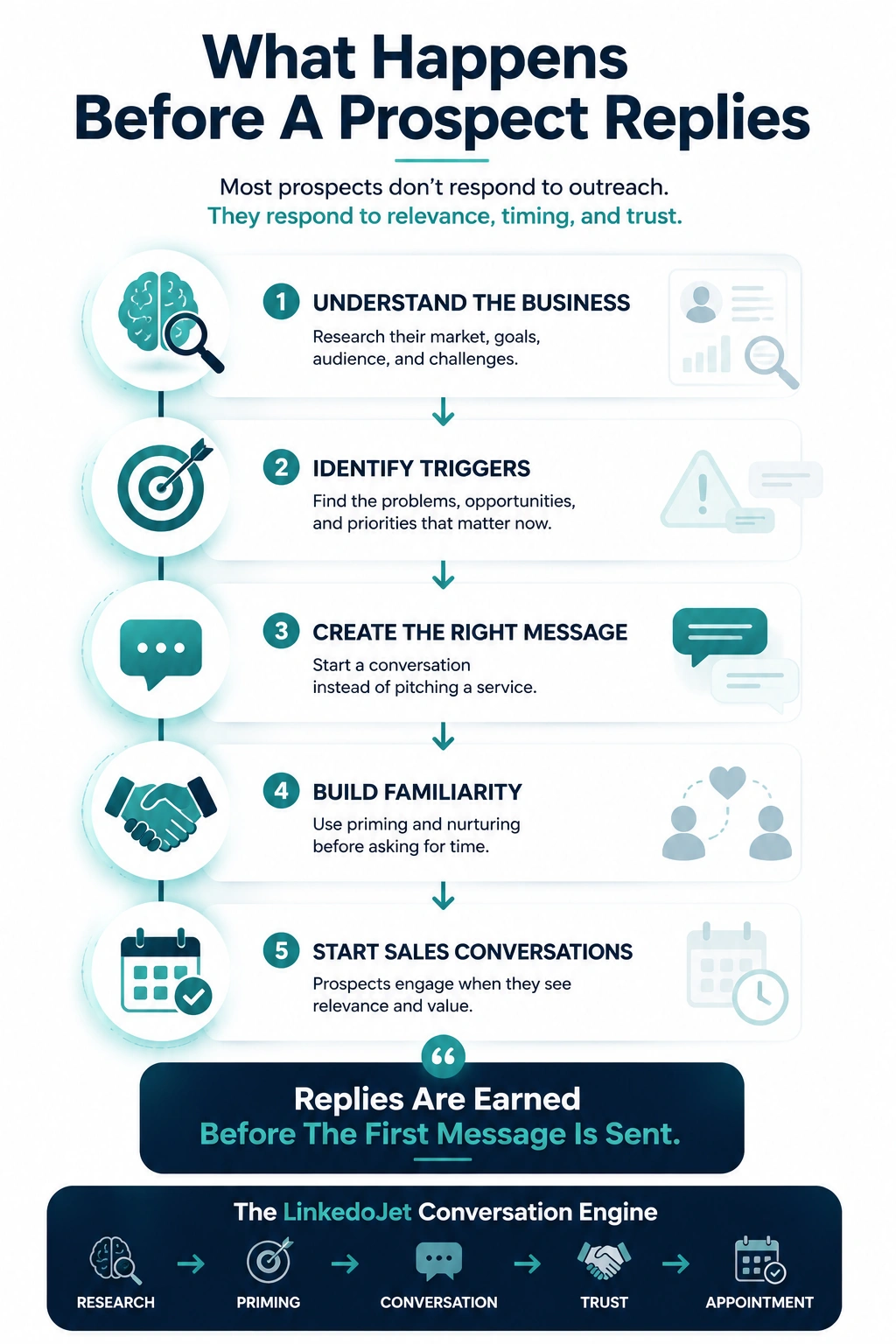
Booked calls come from conversation design. You lead with one recognizable workflow, surface one familiar failure mode, ask a small question that’s easier to answer than to ignore, then nurture with scoping clarity until a short discovery call feels like the obvious next step.
Pick the buyer who owns the mess: segment-language that gets COOs, RevOps, Support, and Finance Ops to engage
“AI-curious” isn’t a segment. The buyer is the person who gets pulled into the room when the workflow breaks.
Most AI automation agencies aim too high (generic C-suite) or too broad (anyone who touched “AI”). The operator who replies is the one with direct exposure to handoffs, exceptions, and metrics they can’t defend.
Segment by workflow ownership, then write in their native language. Same service. Different message.
| Segment | What they actually feel | Language that lands | Good “entry workflow” for a DM |
|---|---|---|---|
| COO / Head of Ops | Operational drag, ownership gaps, escalations, “why is this still manual?” | handoffs, exception handling, SOP drift, queue triage, “who owns this step?” | Onboarding handoff, internal approvals, cross-team routing |
| RevOps / Sales Ops | CRM hygiene, attribution fights, broken routing, unreliable dashboards | field governance, lifecycle stages, lead routing rules, audit trail, pipeline reporting | Lead routing + enrichment + stage governance |
| Support leader | SLA pressure, avoidable tickets, messy triage, macro sprawl | deflection, queue health, escalation paths, categorization, “this ticket shouldn’t exist” | Ticket triage + auto-categorization + exception queues |
| Finance Ops | Reconciliation pain, approval loops, billing errors, audit anxiety | approvals, reconciliation, audit trail, exceptions, close process | Invoice approval + exception routing + audit logging |
When your message uses the right nouns (handoff rules, field ownership, queue health, approval loops), an operator reads it differently. Not as “another AI pitch,” but as “this person has seen the mess I’m dealing with.”
What gets ignored (and quietly damages credibility): fake personalization, vague outcomes, and tool name-dropping
The fastest way to lose the right buyer is to sound like you copied what everyone else is sending.
Operators don’t reject you because you wrote a “bad” sentence. They reject you because the message doesn’t map to a real workflow, and it asks for effort before you’ve earned trust.
These are the patterns getting deleted on sight:
- Empty personalization: “Saw your profile / loved your background” → then a pitch. They know what this is.
- Vague outcomes: “Save 10 hours a week” / “increase efficiency” without naming where the time is actually leaking.
- Tool flexing: “Zapier, Make, n8n, LangChain, HubSpot, Slack…” as if the stack is the strategy.
- Proposal paragraphs: long DMs that read like a scope doc. Nobody wants homework in LinkedIn.
- Meeting-first asks: pushing a call before the buyer has even named a problem.
Here’s the contrast that gets replies:
- One workflow (lead routing, ticket triage, invoice approvals).
- One familiar symptom (exceptions pile up, data drift, “the dashboard lies”).
- One small-answer question with choices, so replying takes ten seconds.
The calibrated sequence: connection → first question → follow-ups → nurture → soft meeting ask → close-loop
This is a conversation ladder. Each message has one job: earn the next inch of attention.
Rule: don’t “sell AI” in the DM. Earn a two-minute reply. Then graduate into a tightly-scoped discovery around one workflow and its edge cases.
1) Connection request (relevance, not flattery)
Example (COO/Ops):
“Noticed you run ops at <
Example (RevOps):
“Quick connect—seeing a lot of teams fighting CRM hygiene + lead routing rules once volume picks up. If that’s in your world at <
2) First message after acceptance (one workflow + small-answer question)
Example (RevOps / reporting trust):
“Quick one—when pipeline reporting gets messy, is it usually (1) data sync, (2) handoff rules, or (3) the exceptions that blow things up?”
Example (Support / queue pressure):
“Curious—what’s the bigger drain lately: (1) ticket triage, (2) repeat questions that should be deflected, or (3) escalations because context is missing?”
3) Follow-up if no reply (symptom-based, grounded)
“The pattern I keep seeing: dashboards look fine until someone asks a basic question like ‘why did this stage change?’ and it turns into manual detective work. Is that a thing in your world, or are your numbers pretty reliable?”
4) Query-based emotional trigger (controlled vent)
“If you had to pick one pain right now—what’s worse: onboarding that’s too manual, reporting nobody trusts, or tickets that shouldn’t exist?”
5) Insight-based nurture (hard-won pattern recognition)
“Most ‘quick automations’ don’t fail in the happy path. They fail at the edges—approvals, odd customer states, messy source data, and unclear ownership. The teams that win treat it like a workflow with exception handling and an audit trail, not a string of triggers. If you ever want, I can share how we scope a first workflow so it doesn’t become spaghetti.”
6) Soft meeting request (optional, scoped, two paths)
“If it’s useful, we could pick one workflow (lead routing, ticket triage, invoice approvals) and do a 15-minute ‘where does it break?’ map. If you’d rather keep it async, tell me the workflow and I’ll send 5 scoping questions here.”
7) Close-loop (protect goodwill)
“No worries if now’s not the time. If you hit a point where exceptions pile up or reporting gets questioned, happy to sanity-check a workflow with you. Want me to close the loop for now?”
Why this works: priming, small-answer questions, and timing that matches how operators read LinkedIn
You’re not fighting “competition.” You’re fighting cognitive load and skepticism from past failed attempts.
Most of your best prospects already tried something: a few Zapier chains, a rushed Make scenario, maybe a lightweight “AI assistant” pilot. It worked until it didn’t. Then the ownership questions started: who maintains it, what happens when data is wrong, how do we audit it, who approves changes?
So the buyer’s filter is simple: does this person understand the messy middle?
- Priming: segment-language signals you belong (handoffs, queue health, field governance, approval loops).
- Small-answer questions: choices reduce effort. Operators can reply between meetings without “starting a project.”
- Symptom-first, not outcome-first: “reporting drift” and “exceptions pile up” feel real; “save time” feels like a pitch.
- Nurture beats persuasion: a scoping insight earns trust without pushing. You’re showing how you think.
- Timing: short messages that stand alone work better than threads that require context. People read LinkedIn in bursts.
The goal isn’t to be clever. It’s to be specific enough that the right operator thinks, “Okay… this sounds like my week.”
Objections, stop rules, and meeting-readiness signals (so you get booked calls without burning trust)
A good sequence doesn’t just push. It knows when to narrow, and when to exit.
Common objections and the right way through
- “We tried Zapier/Make and it got messy.”
Agree, then narrow: “That’s usually exception handling + ownership. If we picked one workflow, where does it break—approvals, data quality, or edge cases?” - “We already have someone doing automations.”
Narrow: “Makes sense. I’m not trying to replace that—more curious if there’s a workflow that keeps getting escalated because it’s brittle.” - “Security/compliance will block this.”
Don’t argue. Acknowledge: “Totally fair. Most of our early scoping is about data boundaries, audit trail, and what stays inside existing systems. Which system is the ‘source of truth’ for you—CRM, ticketing, or finance?” - “No bandwidth.”
Offer the smallest step: “Understood. If you tell me the workflow, I’ll send scoping questions here so you can sanity-check it async.”
Stop rules (keep your name clean)
- They ask to be removed or clearly say “not interested.” Stop.
- They’re locked into a platform partner and there’s no wedge. Exit politely.
- They respond with consistently curt low-signal replies (“no”, “all good”). Don’t chase.
- You can’t identify a workflow owner. If nobody owns it, you won’t close it.
Meeting-readiness signals (when the soft ask feels natural)
- They mention a specific workflow (“lead routing is a mess,” “triage is killing us,” “invoice approvals are chaos”).
- They complain about handoffs, exceptions, or unreliable reporting.
- They ask what tools you work with (HubSpot/Salesforce, Zendesk, Jira, Notion, NetSuite).
- They ask about timeline, effort, cost, or “how would you approach it?”
That’s your cue: propose a short, scoped call around one workflow. Not a broad “AI automation discussion.”
How LinkedoJet runs it day-to-day: targeting, message design by segment, follow-up rhythm, tracking, and appointment support
Most tools send messages. LinkedoJet runs the outbound engine: who you target, what you say, how you follow up, and how replies turn into booked time.
For AI automation agencies, the difference is consistency without losing the operator voice. You can’t “template” your way into credibility in this market. You also can’t hand-write every DM while you’re delivering projects.
LinkedoJet is built for that tension. Operationally, we handle:
- ICP and targeting setup: we define your best entry workflow + buyer segment (COO vs RevOps vs Support vs Finance Ops) and build targeting rules that avoid “AI tourists.”
- Sales Navigator / LinkedIn prospect list building: we create and maintain clean lists by role, company shape, and operational context—so your message matches the recipient.
- Message design by segment: short sequences that use the right nouns (handoffs, SLAs, audit trail, field governance) and ask small-answer questions that earn replies.
- AI-assisted personalization: not fake compliments—light tailoring tied to their world (team, workflow surface area, likely system-of-record) while keeping the message tight.
- LinkedIn outreach execution: we run the daily send, pacing, and follow-up rhythm so it doesn’t turn into frantic bursts.
- Lead reply handling and nurturing: we help manage the “middle”—questions, objections, and the back-and-forth that turns curiosity into clarity.
- Warm lead tracking: we tag intent signals (workflow named, tool mentioned, pain stated) and keep threads from going cold.
- Appointment generation support: we guide the soft ask, the two-option CTA (async or 15-min), and the handoff into your calendar.
- Campaign visibility through dashboards: you see what’s sending, what’s landing, what’s getting objections, and where the bottleneck is.
- Ongoing campaign refinement: we adjust segment language, questions, and pacing based on real replies—so the sequence gets sharper over time.
This approach works even if your offer is broad. We don’t try to explain everything you can do. We pick one entry workflow and one buyer segment, get conversations flowing, then expand once you’ve got repeatable replies.
Answers to the questions operators actually ask
What’s the best LinkedIn messaging strategy for an AI automation agency selling workflow automation?
Lead with a workflow-shaped problem, not “AI.” Pick a buyer segment who owns the workflow (COO, RevOps, Support, Finance Ops), name a familiar failure mode (exceptions, handoffs, data drift, audit trail), then ask a small-answer question with choices. Use follow-ups to add scoping clarity, not pressure.
How long should a LinkedIn messaging sequence be before you stop following up?
Typically 5–7 total touches (including the connection request) across 10–18 business days, with increasing value and decreasing push. If you get a clear “no,” a removal request, or repeated low-signal curt replies, stop earlier. Protect your brand.
How do I pitch AI automation on LinkedIn without sounding salesy or generic?
Don’t pitch “AI automation.” Talk about the mess it’s attached to: approval loops, SLA pressure, CRM fields nobody trusts, reconciliation exceptions. Keep messages short. Ask questions that help them label the problem. When you do propose a call, scope it to one workflow and offer an async option.
What LinkedIn message examples work best when targeting COOs for workflow automation?
COOs respond to operational drag and ownership gaps. Example opener: “When handoffs break, is it more often unclear ownership, approvals that stall, or exceptions that nobody handles?” Then follow with a symptom they recognize: escalations, manual detective work, and SOP drift. Keep it operator-to-operator.
How do you handle common objections like “we tried Zapier/Make and it got messy” or “security will block this”?
Agree and narrow. For “got messy,” shift to exception handling and ownership: where does it break, and who owns each step? For security, acknowledge constraints and talk boundaries: what data moves, where logs live, and what stays inside existing systems. The goal is a small scoped first workflow, not a big bet.
If you want booked calls (not noise), we’ll build and run the sequence with you
This isn’t a “generic discovery call.” You’ll leave with a working outbound engine: targeting, segment-specific messaging, follow-up rhythm, and a clear path from replies to qualified appointments.
On the session, we’ll pressure-test your entry workflow and buyer segment (COO vs RevOps vs Support vs Finance Ops), then map the exact conversation ladder you’ll run on LinkedIn: connection note, first small-answer question, follow-ups, nurture, and the soft meeting ask.
If it’s a fit, onboarding is not “here’s a tool, good luck.” LinkedoJet operationally provides:
- ICP and targeting setup based on workflow ownership (not vague “AI interest”).
- Sales Navigator / LinkedIn prospect list building with maintained lists by segment and context.
- AI-assisted personalization that stays grounded in real ops language (handoffs, audit trail, queue triage, CRM hygiene) instead of generic compliments.
- LinkedIn outreach execution with pacing and follow-up timing that matches how operators actually read LinkedIn.
- Lead reply handling and nurturing so warm threads don’t die in your inbox while you’re delivering client work.
- Warm lead tracking with clear intent signals, thread status, and next actions.
- Appointment generation support to turn “this is painful” into a scoped discovery call around one workflow.
- Campaign visibility through dashboards so you can see what’s landing, what’s getting objections, and what needs adjusting.
- Ongoing campaign refinement as reply patterns change and segments evolve.
After onboarding, you receive a running system: ready-to-send segment sequences, active prospect lists, a follow-up rhythm we manage, and a pipeline of warm conversations that are being nudged toward booked time—without you sounding like another “we do AI” agency.
And to be explicit: LinkedoJet is not ordinary LinkedIn automation. Automation is the smallest part. The real work is targeting, conversation design, reply handling, nurturing, and keeping the engine accountable week after week.
Next step: turn your outreach into operator-led conversations that convert
From identifying the right decision-makers to starting meaningful conversations and turning them into qualified appointments... LinkedoJet manages the entire outbound engine for your business.