
Warm doesn’t mean ready. That’s why your threads die.
In MSP sales, the buyer can be genuinely interested and still refuse a call—because switching feels like downtime waiting to happen.
You see the signals: a connection acceptance, a like on a post about M365 hardening, a profile view right after you mention backup restore testing. Someone even replies once. Then the conversation disappears under escalations, vendor fatigue, and internal politics.
That silence messes with your team’s head. Sellers start re-qualifying the same half-interested accounts, forecasting based on vibes, and poking “just to check in” because doing nothing feels like losing.
The real cost isn’t only the missed meeting. It’s the reputational drift. Each generic follow-up trains the buyer to lump you with every MSP that sounds the same: vaguely helpful, slightly needy, and ultimately easy to ignore.
Managed IT buyers don’t shop. They tolerate their provider until a trigger forces attention: renewal timing, a security questionnaire, a failed restore, internal IT burnout, leadership pressure, an outage that got political. If you’re not present when that window opens, the competitor who stayed calm and relevant gets the first serious call.
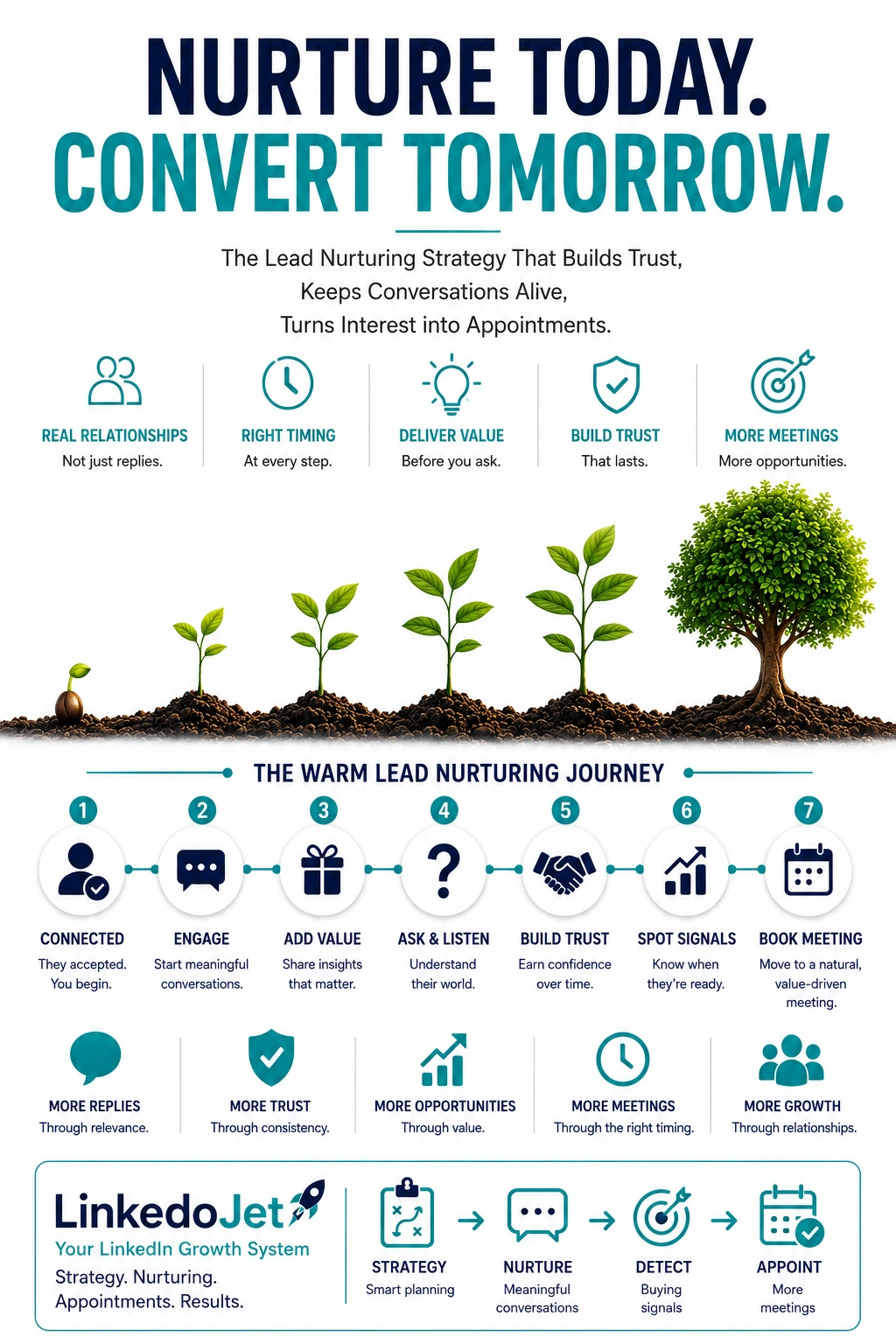
The 6-step progression that turns warm signals into real discovery calls
You’re not “nurturing” to stay busy. You’re earning the next small step until the buyer’s timing becomes real.
Here’s the progression that works for MSP decision-makers because it respects the thing they’re protecting: stability.
| Step | What you’re trying to earn | MSP-native angle |
|---|---|---|
| 1) Confirm relevance | A reply that frames their world | Co-managed vs fully managed, renewal window, security pressure |
| 2) Establish operational credibility | Confidence you won’t create chaos | Onboarding plan, escalation path, ticket model, tooling philosophy |
| 3) Teach without pitching | “This person actually knows what they’re doing” | Takeover gaps: stale admin accounts, M365 sprawl, backup assumptions |
| 4) Micro-commitment | A small diagnostic / one-question next step | 2-minute checklist, quick comparison, one scoped question |
| 5) Recognize triggers | Language that signals readiness | Renewal, audit, outages, ticket backlog, IT turnover, insurance/compliance |
| 6) Transition to discovery | A call with a clear agenda | Current-state pass + what first 30 days would look like |
Notice what’s missing: repeated “want to hop on a call?” That question lands badly when the buyer still thinks switching providers means undocumented environments, surprise invoices, and a month of angry users.
Message example (after connection acceptance):
Thanks for connecting, [Name]. I noticed you’re overseeing ops/IT at [Company]. If you ever end up reviewing your MSP this year, the two things that usually make or break the transition are onboarding clarity and what happens with after-hours escalations. Are you currently fully outsourced, or more of a co-managed setup?
Message example (they reply “co-managed”):
Got it—co-managed is usually the right call when internal IT owns the roadmap but needs ticket coverage and tooling discipline. Out of curiosity, where does it feel messy today: ticket triage, endpoint management, or security baselines (M365/EDR)?
Operational credibility wins: sound like a mature MSP, not a bundle list
Warm buyers don’t need another pitch. They need to believe your takeover won’t be a slow-motion incident.
Most MSP follow-up fails because it talks about services instead of operations. Decision-makers have heard “24/7 support” and “cybersecurity” a hundred times. What they haven’t heard is a calm explanation of how you run transitions, how escalations actually work, and what you standardize versus leave alone.
When you include a few specifics, the thread changes. Not because you’re being technical—but because you’re lowering perceived risk.
- Onboarding clarity: “Here’s what we collect in week one, what we don’t touch until week three, and how we avoid surprise downtime.”
- Service desk reality: “What gets resolved at L1, what triggers escalation, and what’s considered ‘after-hours’.”
- Tooling philosophy: “We don’t rip-and-replace everything. We standardize endpoint management and identity controls first, then decide what’s worth changing.”
- Co-managed respect: “Internal IT keeps ownership. We reduce ticket noise and enforce hygiene so they’re not fighting fires all week.”
This is where role matters. You don’t need different personas. You need different risk language.
- COO: fewer interruptions, predictable response, less operational drag.
- CFO: spend predictability, fewer surprise projects, fewer “we found this later” invoices.
- IT manager: respect, clear boundaries, no blame for inherited messes, documentation that reduces heroics.
Message example (operational proof without chest-thumping):
Quick example from a 70-seat professional services client: the issue wasn’t “IT is broken,” it was ticket noise and slow escalations. We standardized endpoints, cleaned up admin access, and put a real escalation path in place. Within a few weeks, their internal lead wasn’t chasing the same tickets repeatedly. If it’s useful, I can walk you through what we changed without turning it into a sales call.
Teach without pitching: stay relevant during the “not now” weeks
Your job is to be the thread they trust when timing shows up—not the vendor they muted.
Warm engagement is often “learning,” not “buying.” A CFO may engage with your post about insurance questionnaires because it’s coming up in a board meeting—not because they’re ready to replace their MSP. An IT manager may like your ticket hygiene post because they’re drowning, but they can’t introduce change this quarter.
The mistake is filling that gap with generic follow-ups or fear-based security talk. The better move is small, useful clarity tied to takeover realities—things buyers quietly worry about but don’t have time to diagnose.
- Backup “installed” vs restore testing that’s actually been validated.
- Stale global admin accounts and vendor leftovers in M365.
- Endpoint sprawl: unmanaged devices, inconsistent patching, random local admin exceptions.
- Documentation: the environment being hostage to tribal knowledge.
Message example (lightweight value):
One pattern we see when we inherit environments is “backup installed” but restore testing hasn’t been validated in months. If you want, I can share the 5 restore checks we run before we’re comfortable putting our name on it—no pitch, it’s just a useful sanity check.
Send these when you have a reason (they engaged, they replied once, they viewed your profile after a post). Keep it short. One insight, one offer, no chase.
And don’t ignore the hard-won mistakes MSPs make here:
- Hammering follow-ups during the prospect’s firefighting week—then going silent when renewal season actually hits.
- Sending “we do IT support” blurbs that sound identical to everyone else.
- Pushing a meeting before you’ve reduced switching fear (onboarding, escalation, after-hours, documentation).
- Dumping a stack list instead of explaining what changes for the business (ticket noise, risk, response).
- Talking security like a scare campaign. Buyers hear that as “future blame.”
- Talking past internal IT instead of aligning to co-managed reality.
Micro-commitments and meeting readiness: earn the call when the trigger is real
Micro-commitments are how you progress the deal without forcing a timeline the buyer can’t support.
Your next step is rarely “a meeting.” It’s one small decision the buyer can make without risking anything: answer a question, pick a category, confirm timing, react to a checklist.
Use micro-commitments to sort lead temperature:
- Curious: engaged with a post or accepted connection; keep touches light and helpful.
- Evaluating: asks about transition, tooling, SLAs, co-managed boundaries; go deeper operationally.
- In pain: mentions missed response times, outages, billing surprises, audit pressure; move faster with a short diagnostic.
Meeting readiness language in MSP terms usually sounds like:
- “We’re up for renewal soon.”
- “We’re getting killed on response time / escalations.”
- “Cyber insurance / compliance is asking for things we can’t answer.”
- “We failed a restore test / had an incident.”
- “Our IT person left / we’re hiring / we’re stretched.”
- “Leadership wants spend justification and risk clarity.”
Message example (timing signal):
A lot of teams only revisit their provider around renewal or after a security questionnaire lands on someone’s desk. If a renewal is coming up for you, when do you usually start looking—60 days out, 90 days out, or later?
Message example (buying-signal response):
That makes sense. If renewals/outages are in the mix, the fastest way to tell if switching is even worth the disruption is a short “current-state” pass: where the risk is, what’s undocumented, and what the first 30 days would look like. Want to do a quick call to map that out, even if you decide to stay with your current provider?
Message example (soft meeting request, clear agenda):
If you’re open to it, we can do 20 minutes next week. I’ll ask a handful of questions about your environment and how support is run today, and I’ll share what we’d look at in a takeover/co-managed scenario. If it’s not a fit, you’ll still leave with a clearer checklist.
Silence isn’t rejection. It’s usually timing, bandwidth, or politics.
The goal is to reopen the thread with a reason—then pause gracefully when the answer is “not now.”
COOs go quiet when operations catches fire. CFOs go quiet when budgets get frozen or they’re dealing with renewal stacks. IT managers go quiet when they’re drowning in tickets and can’t stomach another vendor conversation.
If your follow-up is “just checking in,” you’re forcing them to do emotional labor. They either ignore you or give you the softest “not right now” they can.
Instead, reopen with timing prompts and choice-based questions. Make it easy to respond in one line.
Message example (reopen after a few days of silence):
Circling back because I’m genuinely curious—when you think about IT support, what’s the thing you’d fix first if you had a magic wand: response time, recurring issues, visibility into what you’re paying for, or security posture?
Message example (dormant revival weeks later, tied to timing):
Hey [Name]—saw your team is hiring/expanding. That’s often when ticket volume and access sprawl show up. Totally fine if now isn’t the moment, but are you closer to a renewal or any compliance/security review this quarter?
And when they give you a negative signal—believe them. Don’t argue. Keep the thread clean.
- “We’re locked in for 18 months.”
- “We just hired an IT manager.”
- “We’re not changing anything this year.”
Message example (polite close-loop):
I don’t want to keep poking you on this. If MSP review isn’t on the agenda, I’ll leave it there. If something changes—renewal timing, a security questionnaire, internal IT bandwidth—message me and I’ll respond quickly.
That last line protects reputation. It also increases the odds they come back when the trigger hits, because you acted like an adult.
FAQ
How often should an MSP follow up with a warm LinkedIn lead without becoming noise?
Start with the signal. If they just engaged or replied, follow up within 24–72 hours while you’re still “in their head.” After that, move to a light rhythm: one useful touch every 7–14 days for curious leads, and every 3–7 days for leads that are clearly in pain or near renewal. If you don’t have a reason to message—pause. Your reputation is part of your offer.
What are the strongest buying signals for switching MSPs or starting a co-managed IT conversation?
Renewal timing is the big one, especially 60–120 days out. Others that show up in real threads: repeated escalation failures, ticket backlog and user frustration, audit/compliance pressure, cyber insurance questionnaires, a failed restore test or incident, internal IT turnover/burnout, and leadership pushing for cost predictability and risk clarity.
How do I move a LinkedIn conversation to a discovery call without pushing too early?
Earn two things first: operational confidence and a trigger. Talk onboarding, escalation paths, and how you approach co-managed boundaries. Then ask timing questions that surface renewal/audit/incident pressure. When the trigger shows up, offer a short, scoped call with a clear agenda: a current-state pass and what the first 30 days would look like—so the prospect can decide if switching is worth the disruption.
What should I say when a COO/CFO/IT manager replies once and then goes quiet?
Don’t “check in.” Reopen with a choice-based prompt tied to their role. COO: stability and interruptions. CFO: spend predictability and surprises. IT manager: ticket noise, tooling discipline, and not being blamed for inherited messes. Keep it one question they can answer in a sentence, then stop if they don’t bite.
How do I nurture LinkedIn leads when the prospect says they’re locked in or “not changing anything this year”?
Acknowledge it and preserve the relationship. Ask one timing question (when renewal planning typically starts) and offer a small, non-sales asset (a takeover checklist, restore test checks, onboarding questions). Then set a light reminder to reappear near likely triggers—renewal windows, audits, hiring growth, or compliance reviews—without weekly nudges.
If you want this running as a system (not a hope-and-pray follow-up habit), we can build it with you
LinkedoJet helps MSPs convert warm LinkedIn signals into booked discovery calls using disciplined targeting, credible messaging, and structured follow-up that doesn’t feel automated.
LinkedoJet isn’t a “send more DMs” tool. It’s an outbound operating rhythm we run with you.
What we operationally provide:
- ICP and targeting setup built around the MSP motions that actually convert (switching, co-managed support, security upgrades)—and the buyer roles you’re selling into (COO/CFO/IT).
- Sales Navigator / LinkedIn prospect list building so you’re not wasting touches on the wrong companies or non-buying titles. We build lists, segment them, and keep them fresh.
- AI-assisted personalization that stays grounded in MSP reality (onboarding, after-hours escalations, tooling discipline) so your messages read like an operator, not a template.
- LinkedIn outreach execution with the right pacing and sequencing—so you stay present without becoming background noise.
- Lead reply handling and nurturing so warm threads don’t die after the first reply. We route conversations by intent (curious vs evaluating vs in pain) and by trigger category (renewal, audit, service desk pain, security).
- Warm lead tracking that tags signals (engagement, profile visits, partial replies) and captures the “why now / why later” so timing doesn’t get lost in someone’s inbox.
- Appointment generation support so when the prospect language shows readiness, the handoff is clean and the meeting request has an agenda the buyer trusts.
- Campaign visibility through dashboards so you can see what’s being sent, what’s landing, and where conversations stall.
- Ongoing campaign refinement based on replies, objections, and what your market is actually responding to.
What happens after onboarding: we stand up your targeting segments, build your prospect lists, write and QA your sequences (including role-aware follow-ups), and start campaigns. Then we monitor signals, manage the nurture rhythm, and continuously tune messaging based on real replies—especially the “we’re locked in” and “not now” cases where most MSPs either nag or vanish.
What you receive: a working LinkedIn outbound system with defined segments, message libraries that sound like an MSP operator, tracked warm leads and triggers, and a repeatable way to move the right accounts into discovery when timing is real.
Why we’re different from ordinary LinkedIn automation tools: tools send. LinkedoJet runs the process—targeting, personalization, execution, reply handling, nurturing, tracking, and appointment support—so your pipeline isn’t dependent on individual sellers “remembering to follow up.”
Next step: turn warm signals into a managed follow-up engine
If your team is getting engagement but not getting discovery calls, the fix is rarely “better scripts.” It’s consistent targeting, credible operational messaging, and follow-up that’s paced around triggers like renewal, audits, outages, and IT turnover.
From identifying the right decision-makers to starting meaningful conversations and turning them into qualified appointments... LinkedoJet manages the entire outbound engine for your business.