
How to find leads for recruitment agencies—using hiring signals on LinkedIn
LinkedoJet turns LinkedIn + Sales Navigator into qualified account lists and decision-maker maps based on real hiring demand (staffing, search, RPO).
- Find companies actively hiring in your niche (not random “might hire” accounts)
- Identify the real budget owners (HR approval + the business-side owner who feels the pain)
- Lead with angles tied to specific openings, locations, and timelines
Speak to our Experts Create my Roadmap to Success
Most agencies don’t lose deals because they’re bad at recruiting. They lose because they show up late, to the wrong person, with the wrong reason.
And you can feel it when the month starts slipping: recruiters are ready to deliver, delivery capacity is sitting there… but the client pipeline is thin and unpredictable.
Why most agency prospecting fails (and the hidden cost of showing up late)
Generic outbound dies quietly. Not with a dramatic “no,” but with a week of silence, a polite “send info,” and then nothing. Meanwhile, a competitor gets the meeting because they were first with a message that felt like it was written for this hiring situation.
The trap is thinking it’s a messaging problem.
It’s timing + stakeholder + trigger.
Hiring demand is noisier now. Companies post jobs to test comp ranges, build a bench, satisfy internal process, or make growth look real. If your list is built on “they have a Careers page” or “they’re in our target industry,” you spend your best hours chasing window shoppers.
Agency-friendly demand shows up in patterns you can see on LinkedIn if you know what you’re looking for: reposting, multi-location pushes, new leaders, expansion posts, funding announcements, or a hiring manager who’s suddenly posting job links like it’s their second job.
When you miss those signals, the cost isn’t just low response rates. It’s a team that loses confidence, a pipeline that whiplashes, and recruiters burning energy on delivery work that never materializes because you didn’t reach the buyer when the pain was acute.
Who to target: HR approval + business-side urgency (multi-threading map)
If you only message HR/TA, you’ll get two outcomes: ignored, or pushed into a vendor process that takes longer than the req stays open.
Urgency lives with the hiring leader. Approval often lives with HR/TA. In enterprise RPO/search, Procurement or Vendor Management can stall you even when the business is screaming for people.
Start with a simple multi-thread map:
HR/TA (vendor approval + process)
CHRO, CPO, VP People/HR, Head of People, Head of Talent, VP Talent Acquisition, Head of Talent Acquisition, Director of Talent Acquisition, Recruiting Manager, Talent Acquisition Manager, HR Director, HR Manager, HR Business Partner
Business-side owners (pain + speed)
VP Engineering/IT, Director Engineering, VP IT, Director IT, COO, VP Ops, Director of Operations, Plant Manager, VP Sales, Sales Director, Customer Support Director
Enterprise stakeholders (gates)
VP Procurement, Strategic Sourcing Manager, Vendor Manager, Finance Director
When to lead with HR/TA: centralized TA, strong process culture, or when the trigger is “TA is understaffed” (new req load, recruiter openings, TA leadership change).
When to lead with the hiring leader: decentralized orgs, urgent technical/operations roles, repeated reposts, or when you can clearly connect the roles to revenue, uptime, safety, or delivery deadlines.
One operator note: the fastest path to meetings is often two parallel conversations—HR hears “process + coverage,” the hiring leader hears “speed + shortlist + fewer dropped balls.” Same account. Different truth.
Qualify the account fast: demand vs window-shopping
You don’t need a perfect scorecard. You need a fast one that keeps your team out of low-intent rabbit holes.
- Hiring volume: jobs posted/reposted in the last 30 days (and whether they keep coming)
- Growth events: funding/M&A, new location/plant/warehouse, new product line, new leadership
- Capacity mismatch: small TA team relative to req load (the “2 recruiters supporting 30 roles” smell test)
- Coverage match: geography + role family + required licenses you actually support
- Disqualifiers: “no agencies” language, layoffs/freeze messaging, vendor-neutral/MSP lock, competitor staffing firms
| Tier | What you see on LinkedIn | What you do next |
|---|---|---|
| A | 10–50 open roles or repeated reposting, plus a growth trigger; limited TA capacity; roles match your niche | Multi-thread immediately; trigger-led angle; faster follow-up cadence |
| B | 3–9 open roles but high criticality (senior/rare skill), new leader, or funding/expansion | Lead with value (market snapshot/comp ranges); nurture if timing is close |
| C | 0–2 roles, no signals, or heavy negatives (freeze/MSP/no agencies) | Deprioritize or park; don’t spend prime outreach cycles here |
LinkedoJet helps you score and segment accounts into A/B/C tiers and then sequence outreach by trigger—so your reps aren’t treating every company like it’s the same opportunity.
Sales Navigator blueprint: filters + 3 plays for staffing, search, and RPO
Here’s the practical way to build lists that don’t waste your week.
Recruitment Agency Lead Search Blueprint (example)
Account filters (company search)
- Geography: match your coverage (use headquarters location when it matters)
- Industry: include your client verticals; exclude Staffing & Recruiting and obvious competitors
- Company headcount: 51–200, 201–500, 501–1,000 (default); 1,001–5,000+ for RPO/search
- Hiring on LinkedIn: Yes
- Headcount growth (past year): positive when available
- Department headcount: Engineering/IT/Sales/Ops/Manufacturing/Healthcare (pick what you place)
- Exclusions: freeze/layoff stories, HR consultancies you compete with, geos you can’t serve
Lead filters (people search)
- Seniority: CXO, VP, Director, Head, Manager (based on stakeholder)
- Function: Human Resources + the hiring function (Engineering/IT/Ops/Sales/etc.)
- Title keywords: Talent Acquisition, HR Director, Recruiting Manager, VP Engineering, COO, Plant Manager, VP Sales
- Spotlights: Changed jobs in last 90 days; Posted on LinkedIn in last 30 days
Three field-tested plays
- Play A (Contingent staffing): mid-market (201–1,000) + Hiring on LinkedIn = Yes + high job count + TA manager/director titles. Aim for roles with churn (ops, customer support, sales) or high volume shifts (manufacturing/logistics).
- Play B (Retained / executive search): VP/C-level openings + “Changed jobs in 90 days” for HR/TA or functional leaders + signals of PE/VC backing or leadership reshuffle. You’re looking for “new org, new scorecard, new team.”
- Play C (RPO / recruiting support): 1,000+ headcount + hiring surge + multiple locations + add procurement/vendor management titles early. This is where deals die if you ignore the gatekeepers.
The point isn’t fancy filters. It’s building searches that consistently surface the reason a company might buy help right now.
What predicts agency-friendly demand (and what to avoid)
Job posts alone aren’t intent. Patterns are.
Triggers LinkedoJet flags and prioritizes
- Hiring surge + reposting: same role reposted, multiple roles in the same function, steady cadence over weeks
- Hard-to-fill roles: niche engineers, clinicians, plant maintenance, ERP, cybersecurity, hunter-style sales roles
- New HR/TA leadership: new Head of TA / Director TA often means vendor reset and urgent gap coverage
- Funding/M&A/expansion: hiring ramps, integration hiring, new locations, new business units
- Project spikes: contract wins, seasonal ramps, compliance-driven hiring bursts (logistics, construction, manufacturing, healthcare)
LinkedIn activity signals (person-level)
- Decision makers posting “we’re hiring,” sharing team job posts, or talking about time-to-fill / candidate drop-off
- Hiring managers repeatedly sharing open roles without HR tagged (usually means “I need people and I’m not getting them”)
- Engagement with TA/RPO content that hints at process pain or capacity strain
Negative signals (don’t ignore these)
- They’re a staffing/recruiting competitor (unless partnership is your strategy)
- Layoffs, hiring freeze, or public cost-cutting messaging
- Vendor-neutral/MSP lock and “no agencies” language in job posts
- Heavy in-house recruiter hiring + ATS/CRM overhaul (often a near-term “we’re doing it ourselves” phase)
- Low job volume, roles closing quickly, or geographies/licenses outside your coverage
Recruiting outbound gets easier when you stop trying to be “top of mind” and start being on time.
FAQ
Is this only for contingent staffing, or does it work for retained search and RPO too?
It works for all three. The difference is which triggers you weight highest. Contingent thrives on volume + reposting + capacity gaps. Retained/search performs when leadership change, PE/VC involvement, or senior role creation is visible. RPO wins when hiring surges across locations and the TA team can’t keep up—plus you include procurement/vendor stakeholders early.
How do we avoid companies that don’t use agencies or are locked into an MSP/vendor-neutral model?
Check job post language (“no agencies”), company-level vendor cues, and whether procurement/vendor management shows up as a stakeholder. If you consistently see MSP language and vendor-neutral framing, tier it as low-fit unless you have a clear wedge (specialty hard-to-fill niche, overflow coverage during surge, or a business-side sponsor pushing for speed).
Do we need Sales Navigator to run this, or can we do it with standard LinkedIn?
You can do pieces with standard LinkedIn, but Sales Navigator makes it repeatable: saved searches, tighter filters, spotlights like “changed jobs” and “posted recently,” and cleaner account/lead list building. If you want this to become a system (not a heroic weekly scramble), Sales Navigator is usually worth it.
Which titles should we start with—HR/TA or the hiring manager/business leader?
Start with whichever side “owns the pain” for the visible trigger. If the trigger is hiring surge + reposting in a function, start with the functional leader and loop HR/TA in. If the trigger is TA capacity strain (recruiter openings, new TA leader, process bottlenecks), start with HR/TA and add the hiring leader so you’re not trapped in vendor limbo.
What hiring signals actually indicate urgency vs “window shopping” job posts?
Reposting cadence, multi-location hiring, repeated roles across levels, and decision makers posting about hiring pressure. Pair that with capacity mismatch (small TA team) and growth events (funding, expansion, new leadership). One-off postings with no pattern, no activity, and no other signals are often wishful thinking.
See your next month of target accounts—built from hiring signals
This isn’t a generic “strategy call.” We’ll show you what a signal-based outbound engine looks like for staffing, search, and RPO—and what you’ll receive if we run it for you.
What LinkedoJet operationally provides: LinkedoJet is a strategic LinkedIn prospect intelligence and client acquisition system for recruiting agencies—turning LinkedIn + Sales Navigator data into qualified account lists, decision-maker maps, and outreach angles tied to specific hiring needs.
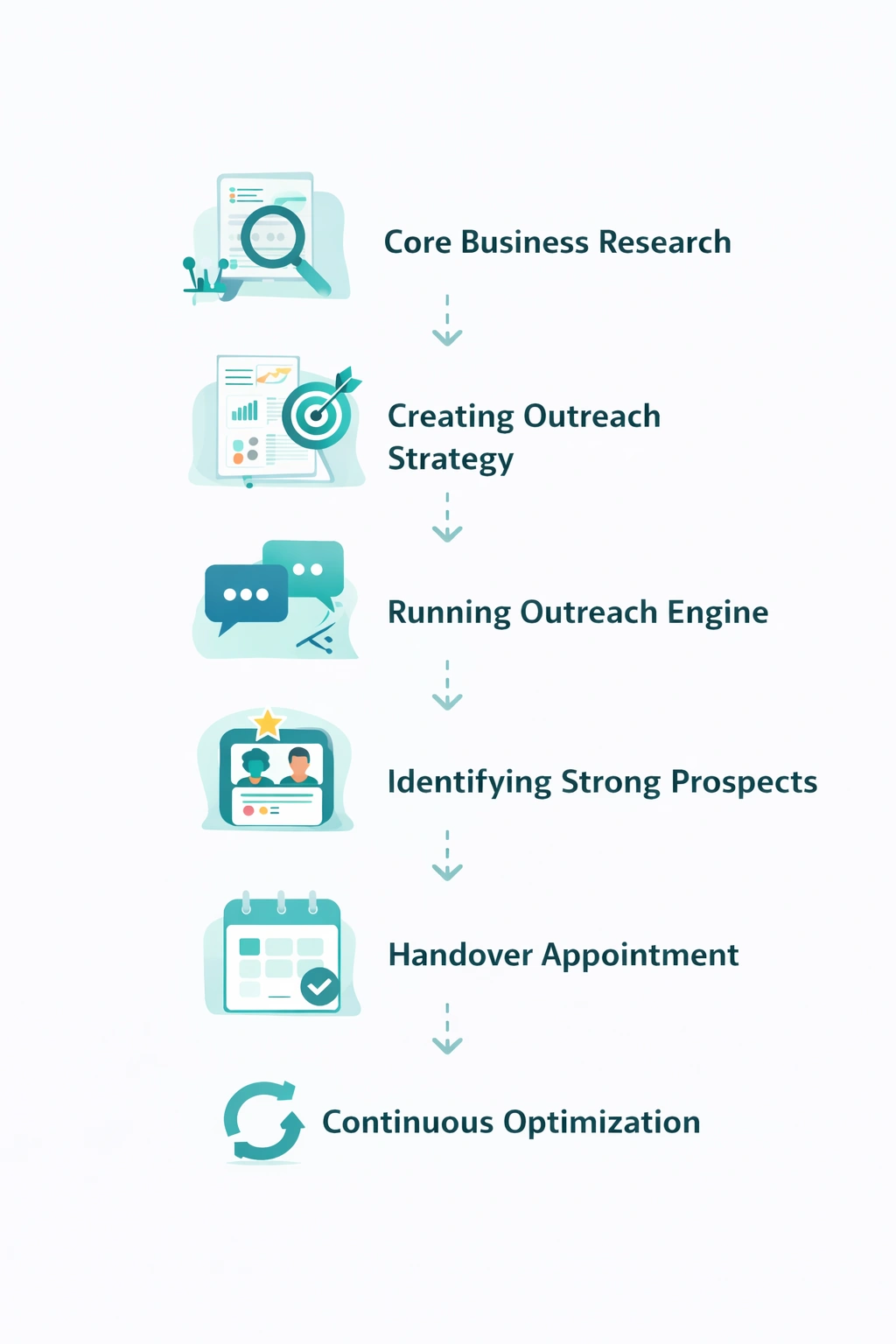
What happens after onboarding: we set up your targeting system (niche, role families, locations, exclusions), build repeatable Sales Navigator searches for Accounts + Leads, and generate segmented lists like:
- Hiring Surge Accounts (last 30 days)
- New HR/TA Leader (changed jobs in last 90 days)
- Funding/Expansion accounts (growth announcements)
- Hard-to-Fill Role lists by your niche
- A title list pack (HR/TA + business owners + procurement stakeholders)
How targeting and list building works: we combine account filters (industry, headcount bands, hiring on LinkedIn, growth, department headcount, geography) with lead filters (seniority/function/title + activity spotlights) so your team stops guessing and starts working accounts with visible demand.
How AI-assisted personalization is used: we don’t spray generic pitches. We generate angles tied to the trigger you’re seeing (reposts, expansion, new leader, hard-to-fill), then tailor by stakeholder (HR approval vs hiring owner vs procurement).
How outreach execution and follow-up works: LinkedoJet runs LinkedIn outreach workflows end-to-end, handles replies, and manages nurture and follow-up sequences so warm conversations don’t die in a busy week.
How warm leads and appointments are tracked: you get clear visibility into who was contacted, which triggers are converting, which stakeholders are responding, and which accounts are warming up—so you can forecast meetings instead of hoping for them.
Why this is different from ordinary LinkedIn tools: tools send messages. LinkedoJet runs a managed system: targeting, list building, stakeholder mapping, trigger-based angles, reply handling, nurturing, tracking, and ongoing refinement based on what’s converting.
From identifying the right decision-makers to starting meaningful conversations and turning them into qualified appointments... LinkedoJet manages the entire outbound engine for your business.
Next step: turn hiring signals into qualified client conversations
If you’re done spending prime BD hours on low-intent accounts, we’ll help you build a repeatable system that finds urgent demand, maps stakeholders, and drives meetings your recruiters can actually fill.
After onboarding, you’ll have segmented target lists, decision-maker maps, and trigger-tied outreach running—plus reply handling, nurture workflows, and visibility into which signals are producing appointments.