
How to find leads for corporate videography agencies (without the feast/famine calendar)
LinkedoJet combines Sales Navigator targeting with LinkedIn activity + company signals to find buyers planning brand, recruiting, product, event, and internal comms video—before the decision window closes.
You already know the feeling: the months where your calendar should be full… and suddenly it isn’t. Editors get idle, producers start chasing “urgent” small jobs, and pricing gets weird because you’re protecting utilization instead of selecting accounts.
Most agencies don’t lose enterprise video work to “better reels.” They lose because they show up after the initiative is funded—or they message the wrong stakeholder while the real owner is quietly picking a vendor.
- Filter by project type (brand film vs recruiting vs launch vs event vs internal comms)
- Detect buying signals (rebrand, hiring surge, product launch, conference season, leadership change)
- Multi-thread decision makers (budget owner + in-house producer/creative ops + procurement)
Get a Corporate Video Lead List | See a Sample Prospect Intelligence Report
Why your current lists aren’t converting
It’s not a contact-finding problem. It’s a timing-and-context problem.
Referrals come in bursts. Inbound gets lumpy. So you do what every corporate video shop does: open Sales Navigator, pull a list of “Marketing Manager” titles at 200–2,000 headcount companies, and hope volume creates luck.
It rarely does—because corporate video is initiative-driven. The budget appears when something changes: a launch, a rebrand, a hiring push, an M&A story, a big event, a new exec who needs the narrative tightened up.
Here’s where lists fail in the real world:
- Wrong stakeholder: you hit demand gen when the work is owned by brand, internal comms, or employer brand.
- Wrong timing: you message after the product launch or after the event recap went live. The vendor was chosen weeks ago.
- No trigger: the company isn’t in an initiative window, so your outreach reads like noise—even if you’re “a fit.”
- No budget proxy: you spend cycles on teams that can’t fund multi-asset video programs, so every call becomes a price fight.
The hidden cost isn’t just lost deals. It’s loss of control. You stop planning. You start reacting.
Who actually buys corporate video (and how the committee is structured)
Corporate video buying fragmented. That’s the opportunity—and the trap. More teams commission video now, which means you can build multiple lanes of demand inside the same account. But only if you target the right owners.
Buyer groups that reliably commission video work:
- Brand / content leaders: brand films, customer stories, CEO narrative pieces, “why us” assets that need polish.
- Product marketing: launch explainers, demo videos, category positioning, sales-facing walkthroughs tied to releases.
- Employer brand / talent acquisition: recruiting campaigns, culture videos, onboarding series, hiring manager toolkits.
- Internal / corporate communications: executive messages, town hall recaps, change-management video, employee comms.
- Events / field marketing: keynote capture, conference sizzles, event recap, booth narrative, roadshow packages.
- Enablement: case studies, training, product walkthroughs, customer proof for sales teams.
Title targeting (start here):
- Marketing: CMO, VP Marketing, Head/Director of Marketing, Director of Brand, Brand Manager, Head of Brand Marketing, Director of Creative, Creative Director, Head of Content, Director of Content Marketing, Content Marketing Manager, Director of Video/Multimedia, Video Producer (in-house), Global Brand Lead, VP/Director Demand Generation, Director of Growth Marketing, Performance Marketing Lead.
- Product/PMM: VP Product Marketing, Director of Product Marketing, Product Marketing Manager, Head of Product Marketing.
- Comms: VP Communications, Director of Corporate Communications, Head of Communications, Internal Communications Manager/Director, Employee Communications Lead, PR/Communications Manager.
- People/HR: Chief People Officer, VP People, Director of Talent Acquisition, Head of Employer Brand, Employer Branding Manager, HR Communications, People Communications.
- Events: Director of Events, Head of Events, Field Marketing Manager, Event Marketing Manager, Experiential Marketing Lead.
- Enablement: VP Sales Enablement, Director of Sales Enablement, Revenue Enablement Manager.
- Enterprise navigation: Procurement Manager, Strategic Sourcing Manager (Marketing), Vendor Manager.
In larger accounts, assume a three-part committee: a marketing/comms owner (outcome + budget), an in-house producer/creative ops (day-to-day + vendor coordination), and procurement (process + risk). If you only message one, you’re gambling.
Copy these Sales Navigator plays (filters, exclusions, and saved-search alerts)
Don’t build one giant list. Build five smaller lists that each map to a reason video gets funded. Then save searches and let alerts tell you when the window opens.
Play A: “Marketing commissioning” (mid-market video budgets)
- Geography: United States, Canada, United Kingdom (add your delivery regions)
- Company headcount: 51–200, 201–500, 501–1000, 1001–5000
- Industry: Software, IT Services, Financial Services, Insurance, Healthcare, Medical Devices, Manufacturing, Logistics, Professional Services, Education, Real Estate
- Exclude industries: Motion Pictures & Film; Marketing & Advertising (remove agencies if you sell to end buyers)
- Seniority: CXO, VP, Director
- Function: Marketing, Media & Communication
- Title keywords: brand, content, creative, video, multimedia, demand gen, growth, product marketing
- Spotlights: Posted on LinkedIn in past 30 days; Changed jobs in past 90 days
Play B: Employer brand / recruiting video (hiring surge)
- Function: Human Resources + Marketing
- Seniority: Director, VP, CXO
- Title keywords: employer brand, talent acquisition, people, internal comms
- Spotlights: Hiring on LinkedIn; Posted on LinkedIn in past 30 days
- Manual check: company page job openings + headcount trend
Play C: Event video (seasonal, high-intent windows)
- Industry: SaaS, Cybersecurity, FinTech, HealthTech, Manufacturing tech
- Function: Marketing
- Title keywords: events, field marketing, experiential
- Spotlights: Posted on LinkedIn in past 30 days
- Timing rule: target 60–120 days before major conference season; prioritize companies announcing speaking/sponsorship
Play D: Customer story / case study (proof-building)
- Company size: 200–5000
- Titles: Director of Content Marketing, Head of Content, Head of Customer Marketing, VP Marketing, Director of Corporate Communications
- Qualification filter: expansion announcements, new enterprise logos, partnership news, funding/news cadence
Play E: Enterprise path (multi-thread)
- Start with account lists: named target accounts by vertical + geo
- Pull three lanes of contacts: marketing leadership, in-house video/creative ops, procurement/vendor management
- Goal: map the buying committee and route around “single-thread” risk
Exclusions that save you weeks
- Company industry exclusions: Motion Pictures & Film, Marketing & Advertising (when selling to end buyers)
- Title exclusions: freelance, “videographer for hire,” wedding, student, intern
- Company keyword exclusions (in search terms): production house, studio, agency, post-production
Operator move: save each play as a separate search and turn on alerts. You want to be notified when a VP Marketing changes roles, when a company starts hiring, and when your targets post—because that’s usually when initiatives get greenlit.
Reach out when timing is real: buying signals + LinkedIn activity to watch
If you only target titles, you’ll keep hearing “not right now.” If you target initiative windows, the same accounts respond differently because the work is already being discussed internally.
| Trigger type | What you can see on LinkedIn | What it often means for video |
|---|---|---|
| Brand / marketing | New CMO/VP Marketing, Creative Director hire; “brand refresh” language; company page visuals change; posting cadence spikes | New narrative + new assets. Brand film, customer story series, refreshed homepage video. |
| Launch / product | PMM posts about launch timelines; feature-release teasers; webinar series announcements; new campaign hashtags | Explainers, demo videos, customer proof, sales enablement walkthroughs. |
| People / HR | Hiring spree posts; new careers page; Head of Employer Brand hire; DEI initiative announcements | Recruiting video series, culture stories, onboarding/internal comms video. |
| Events | Sponsorship posts; “see you at…” announcements; speaking slots; booth builds and roadshow chatter | Keynote capture, sizzles, recap videos, social cutdowns, booth narrative pieces. |
| Comms | Leadership change; M&A announcements; transformation programs; internal comms roles opening | Exec messages, town hall packages, change-management video with higher polish requirements. |
| Vendor switching | Posts thanking an agency; RFP hints; “consolidating vendors” from ops/procurement; Video Producer hired to manage vendors | Incumbent relationship shifting. Shortlist building. You can get in if you show context. |
Activity signals that matter more than people admit:
- Decision makers sharing brand films, event recaps, or customer story content (they’re being measured on story output).
- Posts that read like “we’re telling our story differently,” “refreshing our positioning,” “rolling out a new onboarding program.”
- Company page cadence changes: when the org starts posting more, video is usually next.
Qualify accounts fast: budget proxies, red flags, and how to treat “Video Producer” job posts
You don’t need perfect information. You need a fast “worth a thread / not worth a thread” filter so your team stops burning hours on polite no’s.
Budget proxies (good signs)
- 200+ employees (or smaller but clearly scaling fast)
- Dedicated marketing team with brand/content leadership (not one generalist doing everything)
- In-house designer/creative ops/project management (they can run multi-asset programs)
- Active PR/news cadence, webinars, events, or paid media (they fund distribution, not just production)
- Multi-location teams, complex products, regulated industries (higher need for crisp comms)
Red flags (protect your time)
- The company is a production house, creative agency, or post studio (unless you sell subcontracting)
- “No agencies” language in vendor/procurement pages
- Teams <20 with no clear growth signal (they’ll shop on price and vanish)
- Job posts that read like “replace the agency”: single-person videographer/editor doing everything, no mention of vendor management
- Spec-work requests dressed up as “test project”
When you see a “Video Producer” job post, don’t assume it kills the deal
Most agencies treat it as a dead end. Often it’s the opposite: it’s a signal the company wants more video output and needs someone to coordinate vendors.
How to qualify it quickly:
- If the role says “manage external partners/agencies”, you have an opening. Position yourself as overflow + specialist (customer stories, executive comms, animation, high-stakes launches).
- If the role is purely shoot/edit everything with “replace contractors,” deprioritize unless the company also shows clear initiative triggers (rebrand, launch, event season) and you can offer a narrow specialty.
- Check the hiring manager: if it routes to Brand/Comms/PMM, vendor spend is usually on the table. If it routes to Facilities or IT, it’s often commoditized.
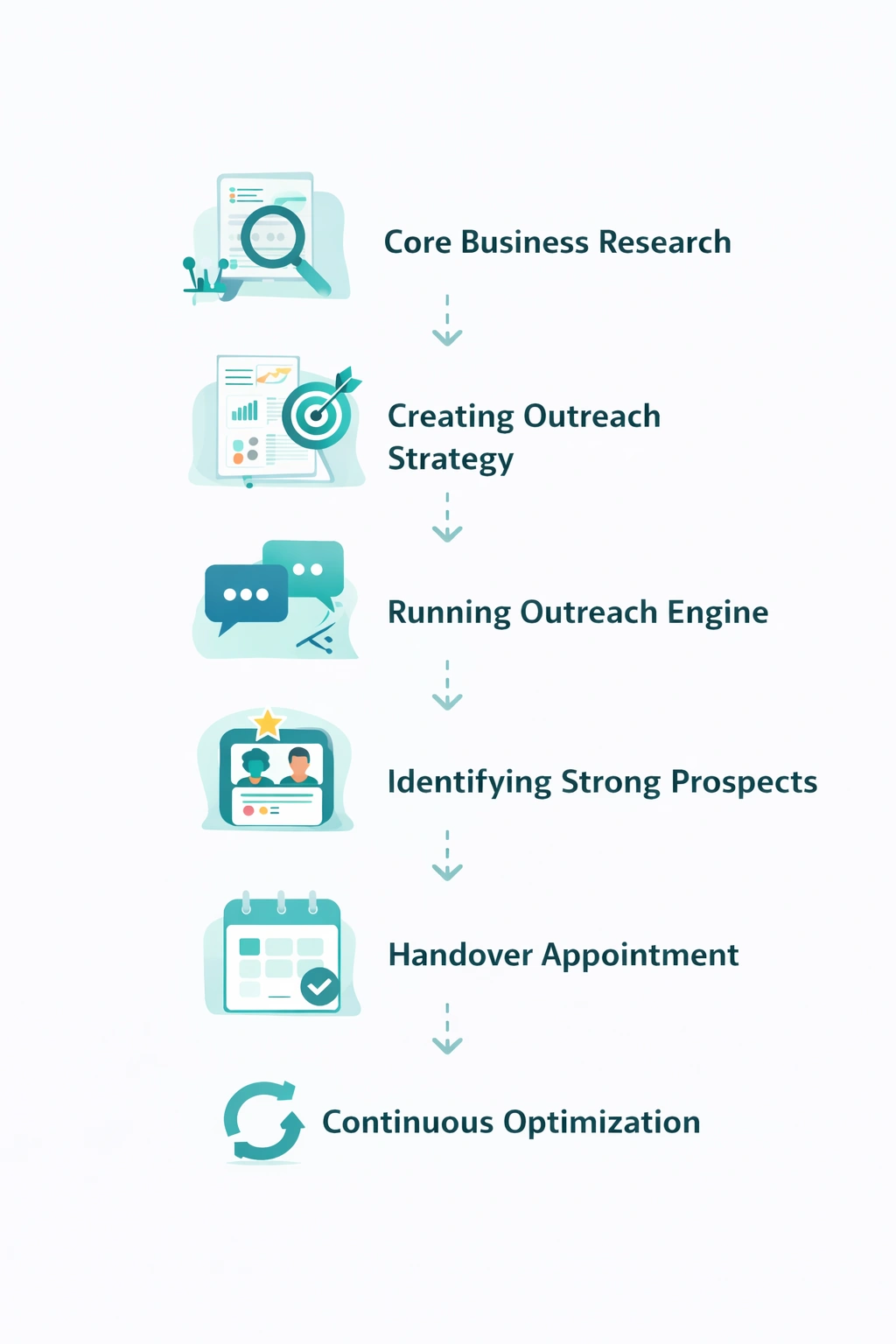
The LinkedoJet system: turn Sales Nav + signals into segmented lead lists, alerts, and outreach angles
LinkedoJet isn’t a LinkedIn automation tool. It’s an intelligence-driven client acquisition system built for agencies that win when they show up early with relevance.
What we set up (so you stop guessing)
- Define ICP by project type + vertical + geo: brand film vs recruiting vs launch vs event vs internal comms, plus your strongest industries and delivery regions (NA/UK/EU).
- Build Sales Navigator searches + account lists: the plays above, saved as separate pipelines (not one catch-all list).
- Enrich with prospect intelligence: stakeholder role (brand vs demand gen vs internal comms), tenure (new leader = change window), activity in the last 30 days, and company context (hiring, announcements, marketing cadence).
- Segment and tag leads by trigger: rebrand, hiring surge, event season, launch, leadership change, vendor-switch signal—so outreach is tied to a real initiative.
- Generate outreach angles (not scripts): short, specific hooks your team can stand behind. Example angles:
- “Saw you’re hiring across sales + CS—recruiting video series that can scale across roles without feeling templated.”
- “New product launch + increased posting cadence—explainer + customer proof package so sales isn’t stuck demoing the same story.”
- “Conference announcements are starting—keynote capture + 10–20 social cutdowns planned before the event, not after.”
- Run outreach and manage follow-up: AI-assisted personalization grounded in observed triggers, reply handling, lead nurturing, and multi-threading inside the account.
- Track warm leads and appointments: dashboards show what’s sent, who engaged, who replied, and which triggers produce meetings—then we refine the campaign.
What you get is simple: fewer dead-end conversations, more initiative-timed meetings, and a pipeline you can actually forecast.
FAQ
Which titles should I target for brand films vs recruiting videos?
Brand films/customer stories: Director of Brand, Head of Brand Marketing, Creative Director, Head of Content, Director of Content Marketing, CMO/VP Marketing (especially when new in role). Add Director of Video/Multimedia and in-house Video Producer as influencers who can champion vendors.
Recruiting/culture: Head of Employer Brand, Employer Branding Manager, Director of Talent Acquisition, Chief People Officer/VP People, plus HR/People Comms. In larger orgs, loop in Internal Comms leaders when the output spans onboarding and executive messaging.
How do I find companies planning a rebrand or launch on LinkedIn?
Watch for combinations, not single signals: a new CMO/VP Marketing or Creative Director hire, a company page visual refresh, a spike in posting cadence, and leadership posts using language like “repositioning,” “refreshing our story,” or “new chapter.” Save searches with spotlights for “Posted in past 30 days” and “Changed jobs in past 90 days,” then check company pages for new campaigns, new hashtags, and refreshed creative.
What if they’re hiring an in-house Video Producer—does that kill the deal or create an overflow opportunity?
It depends on the job description. If it mentions managing external partners, agencies, or freelancers, it’s often a green light: they want more output and need coordination. If it’s a replacement hire (“own all shooting/editing, replace contractors”), deprioritize unless you have a narrow specialty they won’t cover in-house (high-stakes exec comms, animation, customer proof series, multi-location production).
How do I avoid other agencies, production houses, and freelancers in Sales Navigator searches?
Exclude industries like Motion Pictures & Film and (often) Marketing & Advertising. Add keyword exclusions such as “studio,” “production house,” “agency,” and remove titles containing “freelance,” “for hire,” “student,” or “intern.” Then sanity-check the company page: if their services are video/creative delivery, they’re not your end buyer.
Can LinkedoJet build account lists by industry (SaaS, healthcare, finance, manufacturing) and tag them by project type?
Yes. We build vertical-specific account lists (SaaS, healthcare, finance, manufacturing, and more), then tag accounts/leads by likely project type based on observed signals—launch cadence (PMM), hiring surges (employer brand), event activity (field marketing), and internal change signals (comms). That tagging is what makes follow-up relevant instead of repetitive.
Get a segmented corporate video lead list built from real initiatives
This isn’t a generic “strategy call.” We’ll show you exactly how we’d find your next 50–200 target accounts, who the real stakeholders are, and which triggers to time outreach around—then we can run it for you.
What LinkedoJet operationally provides: we build your ICP and targeting system, create Sales Navigator searches and account lists, enrich leads with prospect intelligence, and run LinkedIn outreach with AI-assisted personalization that references real triggers (launches, hiring surges, rebrands, events, internal comms initiatives).
How targeting and list building works: you don’t get one big generic list. You get segmented lists by project type (brand film, customer stories, recruiting video, product launch, event capture, internal comms) and by trigger (new leader, hiring, event season, vendor switch signals). We also map the buying committee so you’re not single-threaded.
What happens after onboarding: LinkedoJet executes the outreach workflow end-to-end—connection + follow-up sequences, reply handling, and lead nurturing. Warm leads are tracked, categorized, and moved through a clear pipeline so you know who’s active, who needs follow-up, and which accounts are nearing an appointment.
How we use AI (without sounding like everyone else): AI assists with personalization and relevance—pulling in role context, recent posts, and company initiatives—while the system keeps messaging anchored to your actual offers and proof. The goal is simple: fewer messages, higher-quality replies.
Visibility and refinement: you get campaign dashboards showing volume, replies, warm leads, and booked meetings. We refine targeting and angles based on what’s converting—so the engine improves over time instead of resetting every month.
Why this is different from ordinary LinkedIn automation tools: tools send messages. LinkedoJet builds the list, watches the signals, personalizes outreach to the initiative, manages follow-up, and supports appointment generation with tracking you can trust.
From identifying the right decision-makers to starting meaningful conversations and turning them into qualified appointments... LinkedoJet manages the entire outbound engine for your business.
Next step: make pipeline predictable
If you want fewer random discounts and fewer “circle back next quarter” replies, you need initiative-timed lists, stakeholder maps, and follow-up that doesn’t drop the ball. That’s the system we run.