
Stop gambling with “Software” searches. Build a qualified SaaS account universe, then map the buyers.
If your workflow is Search → Save 1,000 leads → Message titles, you’re not prospecting—you’re rolling dice. The win is account-first: pick the right SaaS segment, prove fit, map the committee (CRO/RevOps/IT/Finance), and prioritize by timing signals before you send a single message.
You can feel the difference when it’s working. Reps aren’t “busy” all day in Sales Navigator. They’re having a smaller number of conversations with people who actually own the outcome—and they’re reaching out when the company is already in motion.
- Account qualification rules (stage, headcount, motion, stack, exclusions)
- Buying committee mapping (economic buyer + ops champion + technical/finance veto)
- Trigger-based prioritization (funding, hiring, stack change, leadership change, activity)
Why SaaS outbound lists fail on LinkedIn (and what it’s quietly costing you)
Most teams don’t have an outreach problem. They have a targeting and timing problem that looks like a copy problem.
Here’s the pattern: someone exports a giant “industry = software” list, sprinkles in a few titles, and calls it pipeline. Then you watch the team grind—saving leads, sending messages, “following up”—and nothing turns into real opportunities. Not because SaaS buyers are unreachable. Because the list is full of companies that were never going to buy, and the messages go to people who can’t say yes.
The anxiety isn’t about volume. It’s the feeling of losing credibility: with the CEO, with the board, with yourself. You can’t explain why this week should be better than last week—because the system has no rules.
Common failure modes I see in SaaS teams:
- Bloated “software” lists (agencies, consultancies, consumer apps, stealth, tiny pre-GTM products) mixed in with your real buyers.
- Wrong titles (SDR/BDR, generic “Head of Sales”) while RevOps/IT/Finance veto sits unaddressed.
- No “why now”—outreach happens because it’s Tuesday, not because the account is in a buying window.
- No captured context (stack, growth, hiring, leadership change, recent initiatives), so every message feels interchangeable.
The brutal part: you can’t improve what you can’t diagnose. If replies are low, was it the ICP, the persona, or timing? With a messy list, you’ll never know.
More leads makes you feel productive. More qualified conversations makes you predictable.
Who actually decides in B2B SaaS purchases (and why “one title” rarely works)
B2B SaaS buying committees have widened. Even when the need is obvious, deals slow down because the economic buyer wants certainty, the ops owner wants cleanliness, and the technical/finance side wants risk reduced.
So if your targeting is one persona and your message is one angle, you’ll create polite conversations that never close—or worse, you’ll hit the wrong person and trigger internal “vendor noise” defenses.
| Committee role | What they’re protecting | Titles to target (examples) | When they show up early |
|---|---|---|---|
| Economic buyer | Revenue outcome, forecasting confidence, CAC payback | CRO, VP Sales, VP Revenue, Head of Growth, VP Marketing (Demand Gen), CFO (spend control) | Pipeline misses, new GTM targets, board pressure, budget scrutiny |
| Ops champion | Process, data, tooling decisions, adoption risk | Head/VP/Director RevOps, Sales Ops, Marketing Ops, GTM Ops, Business Systems, CRM Manager | New CRM/process initiative, attribution/forecasting pain, handoff issues |
| Technical / security veto | Risk, compliance, integration, data access | CTO, VP Engineering, Head of Platform, Head of DevOps, CISO, VP Security, Head of IT | DevTools/security purchases, SOC2/ISO projects, data movement, SSO requirements |
| Finance / procurement veto | Spend governance, vendor consolidation, terms | CFO, VP Finance, Finance Director, Procurement | Renewals, new category spend, PE efficiency pushes |
Operator reality: in Series B/C, RevOps often becomes the “truth teller.” If RevOps thinks your pitch creates tool sprawl or breaks the data model, the deal dies quietly—no matter how friendly the CRO is.
SaaS account qualification rules that hold up (so your list doesn’t rot)
“SaaS” isn’t a segment. You need rules that survive contact with reality—especially if you sell into mid-market and enterprise where committee + timing matters.
Start by choosing one primary segment for your first list build (you can add segments later):
- Seed/Series A (11–100): building GTM, hiring first AEs/SDRs, installing first real RevOps motion.
- Series B/C (51–500): scaling pipeline, moving upmarket, pressure on forecasting, handoffs, and tooling discipline.
- Enterprise (500+): stakeholder-heavy, slower cycles, higher compliance + procurement weight.
ICP checklist (copy this as your qualification standard):
- Stage: pick one (example: Series B/C) and write it down.
- Headcount band: choose 1–2 bands (example: 51–200 and 201–500). Avoid covering 1–10 through 10,000 “just in case.”
- Growth: prioritize positive headcount growth; treat flat/declining as a different motion (cost focus, vendor consolidation).
- GTM motion indicator: hiring AEs/SDRs, building partnerships, launching enterprise tier, talking publicly about pipeline coverage.
- Stack fit: align to systems you integrate with or replace (Salesforce/HubSpot, Marketo/Pardot, Segment, Snowflake, Datadog, AWS/GCP/Azure—depending on your offer).
- Exclusions: agencies/consultancies/MSPs, consumer-only apps, “stealth” if you require clarity, obvious hiring freezes/layoff cycles, recruiters/talent vendors.
PLG vs sales-led changes the whole approach: PLG lists skew toward product + lifecycle + expansion. Sales-led lists skew toward pipeline ownership + RevOps + SDR/AEs. If you don’t segment this, you’ll message a Head of Growth at a PLG company like they’re a CRO running an SDR team—and you’ll get ignored for good reasons.
Sales Navigator filter stacks you can copy (and the negative filters that keep the list clean)
Account-first means you build an account list, then pull the committee from those accounts. Not the other way around.
Recipe A: Scaling SaaS (Series B/C) RevOps buyers
- Account search: Industry = Software Development (and adjacent SaaS categories) → Company headcount = 51–500 → Headcount growth = positive/growing → Geography = your market (US/Canada/UK/DACH/ANZ) → Keywords = “B2B” OR “platform” OR “API”.
- Save: add to an account list named by segment (e.g., “Series B/C SaaS 51–500 | B2B”).
- Lead search within saved accounts: Function = Operations / Sales / Marketing (as relevant) → Seniority = CXO, VP, Director, Head, Manager → Titles include: “Head of Revenue Operations”, “VP RevOps”, “Revenue Operations Director”, “Sales Operations”, “GTM Operations”, “Business Systems”, “CRM Manager”.
- Activity signal: Posted on LinkedIn in past 30 days = ON.
Recipe B: Funding-triggered SaaS (new money, new targets)
- Account search: Company headcount = 11–200 → Headcount growth = positive → Geography = your market → Keywords = “Series” OR “raised” OR “funding” (plus your category keyword).
- Lead search: Titles include “CRO”, “VP Sales”, “Head of Growth”, plus RevOps titles → Tenure focus: prioritize people who are newer in role where possible (new leaders are more likely to change tools/process).
- Activity signal: Posted in past 30 days = ON (you want reachable humans, not org charts).
Recipe C: Technical SaaS buyers (DevTools / Security)
- Account search: Industry = Software → Keywords = “developer”, “platform”, “infrastructure”, “security”, “compliance”, “SOC2”, “ISO27001” (pick 2–3 that match your offer) → Department headcount (if available): Engineering strong.
- Lead search: Titles include “CTO”, “VP Engineering”, “Head of Platform”, “Head of DevOps”, “CISO”, “VP Security”, “IT Director” → Profile keywords include “SOC2”, “SSO”, “data”, “platform”.
- Activity signal: Posted in past 30 days = ON.
Negative filters (do this every time):
- Title exclusions: Consultant, Coach, Recruiter, Talent Acquisition, Student, Intern, Advisor, Non-Executive Director, Fractional (unless you sell to fractional).
- Keyword exclusions: “agency”, “studio”, “services”, “recruiting”, “staffing”.
- People to deprioritize: “Open to work”, “Seeking new opportunities”.
Buying signals that answer “why now” (and what to say without sounding like everyone else)
Most outbound dies because it’s untimed. You’re asking for attention when the account has no reason to care.
Use a simple prioritization model. No complex scoring required—just tiers based on signal stacking:
- Tier 1: funding + hiring + active posting (the org is moving, and the humans are reachable).
- Tier 2: hiring + leadership change (new targets, new systems, new vendor willingness).
- Tier 3: active posting + stack chatter (signals of pain or initiative, but less urgency).
Signals worth watching for SaaS:
- Funding events (0–90 days): “announced Series A/B/C”, “led by…”, headcount acceleration starts right after.
- GTM hiring waves: SDR/AE hiring, first RevOps hire, Demand Gen lead, Partnerships leader.
- Leadership changes: new CRO/VP Sales/CMO/Head of RevOps/CTO—especially within the last 180 days.
- Stack migrations: “rolling out Salesforce/HubSpot”, “rebuilding attribution”, “new warehouse/BI”, “new outbound stack”.
- Compliance milestones: SOC2 Type II, ISO27001 (security teams get louder, procurement gets stricter).
- Motion change: moving upmarket, launching enterprise tier, opening a new region.
Message angles that don’t feel like spam (examples):
- Funding: “Congrats on the round—when teams go from ‘prove it’ to ‘grow it,’ RevOps usually gets hammered first. Are you already standardizing the pipeline process/stack, or is that still in-flight?”
- Hiring: “Saw you’re hiring SDRs + a RevOps role—usually means new coverage targets. Are you focused on list quality and timing signals, or still working from broad industry lists?”
- Stack change: “Noticed the Salesforce/HubSpot rollout—curious if this is paired with changes to outbound + attribution, or if that’s next quarter.”
Your goal isn’t to sound clever. It’s to sound like you understand what their week looks like.
How LinkedoJet turns LinkedIn into prospect intelligence (not a daily scavenger hunt)
LinkedoJet is built for teams that want LinkedIn to produce controlled, explainable pipeline—without turning your SDRs or founders into full-time list miners.
We’re not “automation-first.” The sequence comes last. The intelligence comes first.
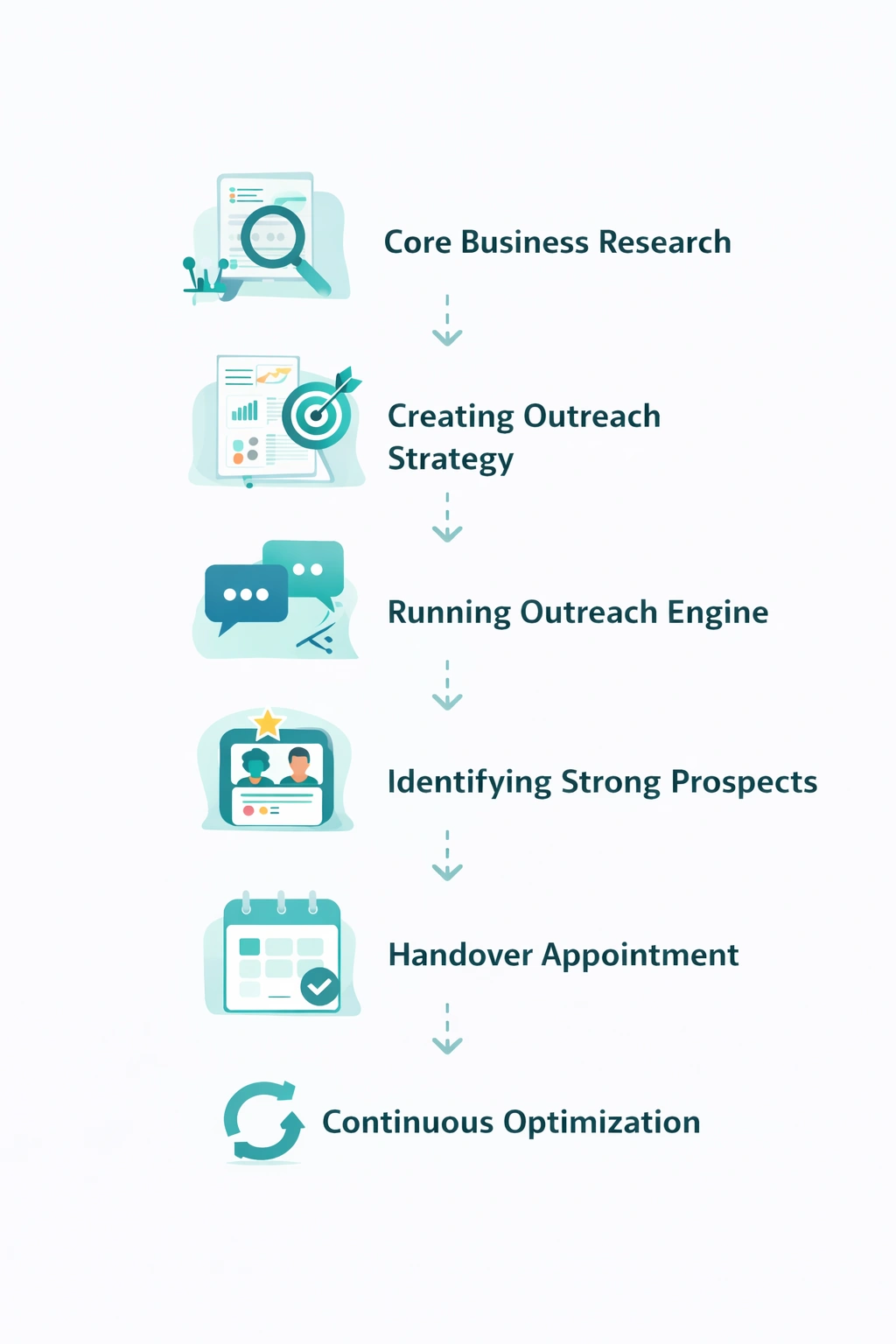
The system (what actually happens):
- Define SaaS ICP segments + exclusions: stage/headcount bands, motion (PLG vs sales-led), stack fit, and hard disqualifiers (agencies, consumer-only, freeze signals).
- Build Sales Navigator account lists: account-first lists by stage + growth + geo + keywords that match your buyer reality.
- Map the buying committee: economic buyer + ops champion + technical/finance stakeholders per account, with title patterns that match your segment.
- Detect timing signals: funding, hiring, leadership change, stack migration, compliance milestones, and LinkedIn activity.
- Produce outreach-ready lead lists with context: prioritized leads with short notes (why this account, why this person, why now) so messaging isn’t generic.
- Execute and manage outreach end-to-end: AI-assisted personalization where it matters (trigger + role + hypothesis), LinkedIn outreach execution, reply handling, nurturing follow-ups, warm lead tracking, and appointment generation support—with campaign visibility through dashboards and ongoing refinement.
What you get is not “more activity.” You get better inputs and a repeatable operating rhythm: clean account lists, mapped buyers, prioritized by signals, with messaging angles your team can stand behind.
From identifying the right decision-makers to starting meaningful conversations and turning them into qualified appointments... LinkedoJet manages the entire outbound engine for your business.
FAQ
Which SaaS stages does this work best for: Seed/Series A, Series B/C, or enterprise?
Best results usually come from Series A through Series C where there’s real budget and urgency, but the org still moves fast. Seed can work if there’s clear hiring and a defined motion. Enterprise works too, but only if you’re ready for heavier committees (security/procurement) and longer cycles.
How do you target PLG vs sales-led SaaS differently on LinkedIn?
PLG targeting tends to prioritize Growth, Lifecycle/Monetization, and often Product/RevOps alignment; sales-led targeting prioritizes CRO/VP Sales, RevOps, and pipeline capacity signals like SDR/AE hiring. The messaging and committee map change—same platform, different reality.
How do you spot buying intent on LinkedIn without running ads?
Watch for stacked signals: funding announcements, hiring waves (SDR/AE/RevOps/Demand Gen), leadership changes, compliance milestones, and posts that reference pipeline coverage, tooling rebuilds, attribution, or “moving upmarket.” Then prioritize accounts where the stakeholders are active on LinkedIn (posted in the last 30 days).
What titles should we prioritize for RevOps and pipeline tooling decisions?
Start with: Head/VP/Director of Revenue Operations, Revenue Operations Manager, Sales Operations, GTM Operations, Business Systems, CRM Manager. Then layer the economic buyer (CRO/VP Sales/VP Revenue) and, where relevant, technical/finance veto roles.
How do you avoid agencies, consultants, and low-fit “software” companies in Sales Navigator?
Use exclusions aggressively: keywords like “agency”, “studio”, “services”, “recruiting”; title exclusions like Consultant/Coach/Fractional/Recruiter; and segment rules (stage/headcount/growth/stack). If the company can’t be described in one line as a B2B SaaS with a real motion, it doesn’t make the list.
See what your first qualified SaaS account list looks like (with mapped buyers and timing notes)
This isn’t a vague “discovery call.” We’ll pressure-test your current targeting, then show you the exact structure we’d run: ICP rules → account lists → committee mapping → trigger-based prioritization → outreach execution and follow-up.
Operationally, LinkedoJet provides: ICP and targeting setup, Sales Navigator prospect list building, AI-assisted personalization, LinkedIn outreach execution, reply handling and lead nurturing, warm lead tracking, appointment generation support, and campaign visibility through dashboards—then ongoing refinement as the market teaches us what’s working.
What happens after onboarding: we build your SaaS segments (PLG vs sales-led, stage/headcount bands), implement exclusions to keep lists clean, create account lists first, then map the buying committee per account (economic buyer + RevOps/ops champion + technical/finance stakeholders). After that, we monitor triggers (funding, hiring, leadership change, stack migration, activity) and keep a prioritized queue so outreach hits when there’s a reason to respond.
What you receive: a prioritized set of SaaS accounts, mapped decision-maker and champion targets, context notes for “why this account / why this person / why now,” recommended message angles by trigger, and a running view of conversations, warm leads, and booked meetings. You’ll see what’s being sent, what’s landing, and what’s converting—without living in Sales Navigator all day.
How targeting and list building works: we don’t start from “Software.” We start from your deal reality—headcount bands, GTM motion, stack fit, and disqualifiers—then build named account lists you can defend in a pipeline review.
How AI-assisted personalization is used: we use AI to draft first-pass personalization around triggers and role context (funding/hiring/stack/initiative), then we apply operator QA so you don’t send embarrassing “template-in-disguise” messages.
How follow-up and nurturing works: replies are handled with clear rules, warm leads are tagged and tracked, and follow-up sequences are timed around the prospect’s signal—not mindless daily pings. The goal is momentum without annoyance.
Why LinkedoJet is different from ordinary LinkedIn automation tools: tools send messages. LinkedoJet runs the system: account selection, committee mapping, timing intelligence, execution, nurturing, and visibility—so you can explain results and improve them.
Next step: turn LinkedIn from noise into a controlled outbound engine
If you want fewer targets, better targets, and outreach that lands because it’s timed and relevant, we’ll build the account-first system and run it with you—lists, committee maps, signals, messaging, follow-up, and visibility.