
How to find leads for AV & smart office solution providers—using LinkedIn signals, not guesswork
Identify companies planning office moves, meeting room refreshes, Teams/Zoom room rollouts, and digital signage projects—and map the IT + Facilities + Real Estate buyers before procurement shows up with a short list.
- Build target account lists by footprint and fit (multi-site, 200–5,000+ employees, hybrid/RTO activity)
- Map the buying committee per account (IT/UC + Workplace/Facilities + Corporate Real Estate)
- Spot live “why now” signals (posts, hiring, org changes) that point to budgeted work and timing
Speak to our Experts Create my Roadmap to Success
If your revenue depends on narrow windows—fit-outs, refresh cycles, room standards, multi-site rollouts—then “more outreach” isn’t the answer. Missing the window is the problem.
The worst moment isn’t a no. It’s hearing, “We already went with our incumbent” or “RFP drops next week” after you’ve spent months posting, networking, and sending sequences that created activity but not projects.
Why AV/smart office lead gen stalls: timing windows, incumbents, and multi-thread buying committees
The industry doesn’t punish you for being wrong. It punishes you for being late.
Most AV and workplace tech projects start as internal frustration and a quiet initiative: unreliable rooms, inconsistent standards across offices, a new hybrid policy, an executive briefing center that can’t embarrass the brand, a relocation with a hard move date. By the time a formal RFP exists, the “real” buying has already happened—scope framed, budget defended, and an incumbent invited to define the standard.
Meanwhile, the buying committee has moved upstream and sideways:
- IT/UC owns platforms, security posture, network readiness, and “room reliability.”
- Workplace/Facilities owns space experience, utilization pressure, and day-to-day pain from broken rooms.
- Corporate Real Estate / Capital Projects controls timing, vendors, and the fit-out calendar.
- Procurement usually arrives when the decision is already emotionally and technically made.
Generic LinkedIn outreach fails here for a simple reason: it ignores initiative ownership and timing. You end up single-threading a procurement title or a broad IT contact while the actual initiative is being shaped two org charts away.
And you feel it in the forecast: lots of conversations, few scoped projects, and install calendars that stay lumpy.
What a qualified AV/smart office lead actually looks like (fit + committee + initiative clues)
“Lead” is a dangerous word in AV. You can get a hundred contacts and still have zero projects.
A qualified opportunity usually shows up as a combination of three things: the right account, the right people, and a believable why now. Miss one, and you either get ignored (wrong person), stuck in limbo (no trigger), or dragged into a late-stage bake-off (wrong timing).
Account fit (worth your team’s attention)
- 200–5,000 employees for repeatable rollouts; 5,000+ for enterprise standardization
- Multi-site footprint (HQ + regionals, campus environments, training centers, CX centers)
- Industries with AV density: professional services, tech/SaaS, finance/insurance, healthcare admin, higher ed admin, manufacturing HQ, logistics HQ, co-working/flex operators
- Platform clues: Microsoft 365/Teams, Zoom, Cisco/Webex; signals around Crestron/Extron/Poly/Logitech/Shure/Barco ecosystems
Contact fit (who can actually move a project)
- IT/UC: CIO, VP IT, Director of IT, Infrastructure Manager, Network Manager, UC/Collaboration Director/Manager
- Facilities/Workplace: VP Facilities, Director of Facilities, Head of Workplace Experience, Workplace Manager, Corporate Services Director
- CRE/Capital Projects: VP Corporate Real Estate, Capital Projects Manager, Construction PM, Program Manager, Owner’s Rep
- Influencers: AV/UC engineers, IT ops managers, workplace tech specialists, office ops (often where room pain first surfaces)
Initiative clues (your early-warning system)
- Language like “room standard,” “refresh cycle,” “meeting equity,” “global rollout,” “AV modernization”
- Posts about RTO/hybrid, utilization, hoteling/desk booking, room booking upgrades
- Visible fit-out motion: relocation, new floor, new HQ, tenant improvement, ribbon cutting
- Hiring for workplace tech, UC, facilities PMO, capital projects
Map the committee the way the project really moves (and stop starting with procurement)
AV and smart office deals are rarely “won” by the first person who replies. They’re won by the account where you mapped the internal chain of custody early—then showed up with context when the initiative needed a partner.
| Stakeholder group | What they’re protecting | Titles to start with |
|---|---|---|
| IT / UC / Infrastructure | Security, standards, network readiness, platform alignment, support burden | CIO, VP Information Technology, Director of IT, Infrastructure Manager, IT Ops Manager, Network Manager, Unified Communications Manager/Director, Collaboration Manager |
| Facilities / Workplace | Room uptime, space experience, vendor responsiveness, on-site reality | VP Facilities, Director of Facilities, Facilities Manager, Workplace Manager, Head/Director of Workplace Experience, Corporate Services Manager/Director, Office Operations Manager |
| Corporate Real Estate / Capital Projects | Timeline, GC coordination, build budget, standards across sites, move dates | VP Corporate Real Estate, Director of Real Estate, Real Estate Manager, Workplace Strategy Director, Capital Projects Manager, Construction Project Manager, Program/Project Manager, Owner’s Rep |
| Procurement / Finance (later) | Commercial terms, vendor compliance, competitive process | Procurement Manager, Strategic Sourcing, Vendor Manager, Category Manager (IT/Facilities), FP&A Manager |
Practical sequencing that works:
- Start with the initiative owner (IT/UC, Workplace, or CRE—varies by trigger).
- Map the adjacent owner (if IT is driving, you still need Workplace; if CRE is driving, you still need IT sign-off).
- Then add the operators (UC engineers, IT support managers, facilities coordinators) who will validate pain and scope.
- Bring in procurement when there’s a defined project, not when you’re trying to create one.
Want LinkedoJet to map this committee for your target accounts? We’ll build the account universe, identify the right titles per stakeholder lane, and attach context from profiles so your first message doesn’t sound like a template.
Sales Navigator plays that surface AV integrator leads tied to Teams/Zoom rooms, fit-outs, and workplace upgrades
Sales Navigator is only powerful when you stop treating it like a directory. You’re not hunting “Facilities Manager.” You’re building parallel lists for each lane of the buying committee—then sorting by signals.
Account universe (run this first)
- Geography: your service region (or pick major metros / hybrid hubs if you serve nationally)
- Headcount: 200–5,000; add a second segment for 5,000–10,000+
- Industries: Information Technology & Services, Financial Services, Banking, Insurance, Management Consulting, Legal Services, Accounting, Real Estate, Construction (owner/developer), Higher Education, Hospital & Health Care (administrative), Pharmaceuticals, Manufacturing
Play A: “Teams Rooms / Zoom Rooms rollout” lead search (IT/UC lane)
- Seniority: Manager, Director, VP, CXO
- Function: Information Technology
- Title keyword logic: (“Unified Communications” OR UC OR Collaboration OR “Workplace Collaboration” OR “IT Infrastructure” OR “IT Operations”) AND (Manager OR Director OR Head OR VP)
- Spotlights: Posted on LinkedIn in past 30 days; Changed jobs in past 90 days
List output: save as “UC/Collab—active” and add a note field for platform clues (Teams/Zoom/Webex) and any reliability language.
Play B: “Office move / fit-out / capital projects” lead search (CRE lane)
- Function: Real Estate, Operations, Program/Project Management
- Title keyword logic: (“Corporate Real Estate” OR CRE OR Construction OR “Capital Projects” OR “Workplace Strategy” OR “Project Manager” OR “Program Manager”)
- Spotlights: Posted in past 30 days; Mentioned in the news (when available)
List output: save as “CRE/Capital—timing” and capture any move dates, build partners, or location expansions referenced.
Play C: “Workplace experience upgrades” lead search (Workplace/Facilities lane)
- Function: Operations (and Real Estate where relevant)
- Title keyword logic: (Facilities OR Workplace OR “Workplace Experience” OR “Corporate Services” OR “Office Operations”) AND (Manager OR Director OR Head OR VP)
- Spotlights: Posted in past 30 days; Changed jobs in past 90 days
If you want a simple operating rule: build three lists per account set (IT/UC, Workplace, CRE), then run signals across all three. That’s how you avoid being early with the wrong person or late with the right one.
The “why now” signals that reliably show timing for AV, room standards, and smart office work
Signals are the difference between “checking in” and showing up when budget and urgency exist.
Office move / buildout triggers
- What to look for: lease signing, relocation, new HQ, “fit-out,” tenant improvement, ribbon cutting, “new floor,” campus expansion
- Where it shows up: CRE leader posts, company page updates, construction PM content, leadership announcements
- What it implies: conference room build, standard packages, digital signage/wayfinding, training rooms, executive spaces
Hybrid work / RTO triggers
- What to look for: “return to office,” “hybrid policy,” utilization, hoteling, desk booking, “workplace experience” language
- What it implies: higher meeting room demand, reliability scrutiny, room booking + display upgrades, managed AV conversations
Meeting room / UC triggers
- What to look for: Teams Rooms/Zoom Rooms mentions, room reliability pain (audio issues, echo, camera framing, “meeting equity”), standardization language (“global room standard,” “room refresh,” “modernization”)
- What it implies: platform-aligned room packages, device standard decisions, support model changes
Digital signage / experience triggers
- What to look for: lobby refresh, brand experience center, wayfinding, internal comms screens, visitor journey
- What it implies: signage networks, content governance, refresh cycles tied to the fit-out timeline
Network/IT adjacency triggers (quiet leading indicators)
- What to look for: Wi‑Fi 6/6E, SD‑WAN, network refresh, office connectivity upgrades
- What it implies: they’re preparing the foundation that makes AV/IoT deployments less painful—often a precursor to room upgrades
Hiring signals (timing + scope)
- “Workplace Technology Manager” / “Head of Workplace Experience” → roadmap and standards are being written
- “UC Engineer” / “Collaboration Engineer” → platform ownership tightening; rollout support load increasing
- “Facilities Project Manager” / “Construction PM” / “Capital Projects” → build schedules and vendor stacks forming now
- Multiple AV tech openings across locations → deployment or expansion, not a one-off fix
- Negative signals: layoffs, office closures, footprint reduction posts; treat as disqualifier unless you sell consolidation/room optimization
Also be honest about disqualifiers. Exclude competitors/integrators, residential-only shops, sub-50 headcount accounts unless you explicitly target executive briefing centers, and procurement-only contacts as a first touch. That’s how you keep your team out of dead-end threads.
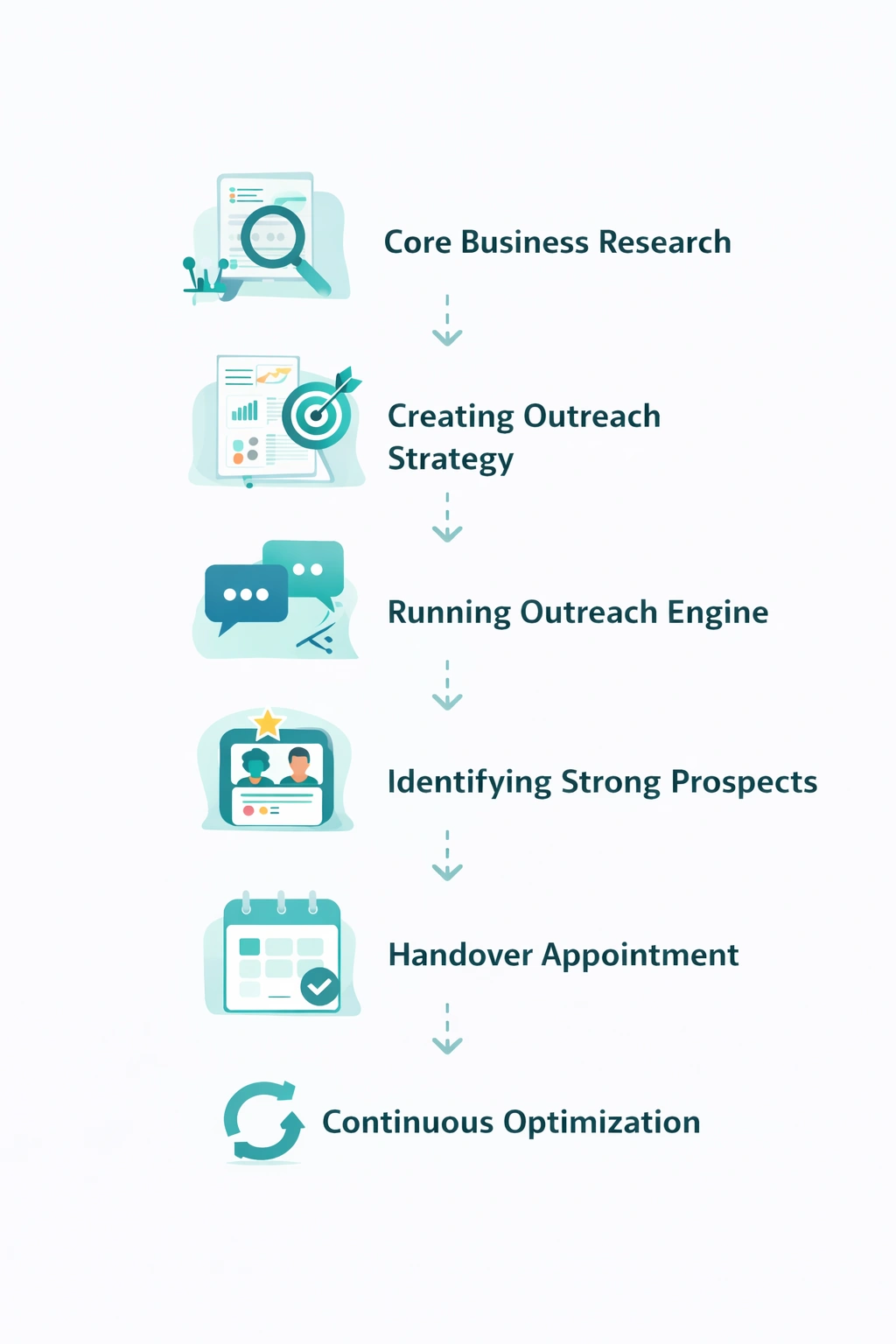
The LinkedoJet system: a 4-step prospect intelligence workflow for AV & smart office projects
The goal isn’t more activity. It’s predictable timing: a pipeline built around real initiatives, not random titles.
LinkedoJet is not “a LinkedIn automation tool.” It’s a managed prospect intelligence and outbound execution system that turns your ideal project profile into a prioritized, signal-driven target list—and then runs the outreach and follow-up until conversations convert into booked meetings.
The 4-step workflow
- Define the ideal project profile
We get specific: meeting room refresh, Teams Rooms/Zoom Rooms standard, signage, managed AV, smart office/IoT, multi-site rollout. We document your deal size bands, typical room types, and the delivery model you want (design-build vs managed services). - Build the account universe (Sales Navigator + footprint qualifiers)
We build your target account list based on headcount, industry, geography, multi-site indicators, and platform fit. Not a giant list—an account universe your team can actually win. - Map the buying committee and extract profile context
For each account, we identify IT/UC, Workplace/Facilities, and CRE stakeholders plus influencers. We capture context from profiles and company activity so outreach can reference the initiative and the owner lane (instead of a generic pitch). - Monitor signals, prioritize, and run outreach + nurturing
We watch for “why now” signals (posts, hiring, org changes), prioritize accounts accordingly, and execute outreach with AI-assisted personalization. Replies are handled, follow-ups are nurtured, warm leads are tracked, and appointments are supported through to booking.
What you should expect operationally: targeted lists, committee maps, message angles tied to initiatives, consistent execution, and visibility into what’s working via dashboards. Then ongoing refinement as your market and response data changes.
From identifying the right decision-makers to starting meaningful conversations and turning them into qualified appointments... LinkedoJet manages the entire outbound engine for your business.
FAQ
Who should we target first for workplace technology projects—IT/UC or Facilities?
Start with whoever “owns” the trigger you can prove. If the signal is platform-driven (Teams Rooms/Zoom Rooms standard, security posture, network changes), lead with IT/UC and map Workplace immediately as the co-owner of the day-to-day pain. If the signal is space-driven (fit-out, move, utilization push, workplace experience mandate), lead with CRE/Workplace and map IT as the gatekeeper for standards and support. The miss is picking one lane and pretending the other doesn’t exist.
How do we find companies planning conference room AV upgrades before the RFP drops?
Look for pre-RFP motion: fit-out and relocation posts, new Workplace Experience leadership, hiring for UC/Workplace Technology, and standardization language (“global room standard,” “refresh cycle,” “AV modernization”). Then build a committee map and start conversations tied to that initiative (“saw the new office expansion + Teams standardization push—who owns room standards and support?”). That’s earlier than procurement, and it’s where scope is shaped.
Does this approach work if our offer is Teams Rooms-specific or Zoom Rooms-specific?
Yes—specialization often improves response because your message can be narrower and more credible. The key is aligning the search and signals to that ecosystem: IT/UC titles, platform language in posts, device standard discussions, and hiring for collaboration engineering. You’re not pitching “AV.” You’re showing up as the operator who reduces room failure rates and support load for a specific platform.
How do you handle multi-location rollouts and room standards without spamming hundreds of people?
You don’t brute-force it. You work from a committee map and sequence by lane: start with the standard owner (often UC/IT or Workplace Tech), then loop in Workplace/Facilities, then the regional operators. Outreach is paced and personalized around the rollout reality (“standard package,” “support model,” “regional deployment plan”), not a generic blast. The goal is one internal champion who can pull you into the rollout motion.
What if the target account has an in-house AV/UC team—should we still pursue it?
Often, yes—but treat it as a different sale. In-house teams still outsource design spikes, multi-site deployments, overflow installs, specialty spaces (briefing centers, divisible rooms), managed services coverage, and refresh cycles. If their messaging is “we do everything ourselves,” lower the priority. If you see hiring pressure, reliability complaints, or standardization pushes, it can be a strong timing signal that they need a partner.
See what LinkedoJet would build for your AV/smart office pipeline
This isn’t a generic “discovery call.” We’ll walk you through the exact outbound engine we’d run: targeting, committee mapping, signal monitoring, AI-assisted personalization, reply handling, nurturing, and booked-meeting support—built around your project profile.
What LinkedoJet operationally provides:
- ICP and targeting setup: we define your ideal project profile (Teams/Zoom rooms, room standards, signage, managed AV, smart office) and the account filters that match your delivery reality.
- Sales Navigator prospect list building: we build an account universe (200–5,000+ employee bands, multi-site qualifiers, industry clusters) and create parallel lead lists for IT/UC, Workplace/Facilities, and CRE/Capital Projects.
- Buying committee mapping: we identify decision-makers plus influencers per account and capture profile context (remit, tenure, initiative language, platform clues) so your outreach is grounded in what they’re actually working on.
- AI-assisted personalization: personalization is guided by real signals (fit-out posts, RTO announcements, room reliability pain, hiring) so messages read like a competent operator wrote them—because the “why now” is real.
- Outreach execution on LinkedIn: LinkedoJet runs the day-to-day outbound workflow (connection, messaging, sequencing) with pacing and guardrails designed for senior stakeholders.
- Lead reply handling and nurturing: we manage replies, route warm conversations, and run follow-up workflows so “not now” doesn’t disappear—especially when timing is the whole game.
- Warm lead & appointment tracking: you get visibility into who engaged, what signal triggered prioritization, where each conversation sits, and which meetings were booked—via dashboards built for campaign control, not vanity metrics.
- Ongoing campaign refinement: we adjust targeting, messaging angles, and stakeholder lanes based on response data and market shifts.
What happens after onboarding: you don’t get a login and a template. You get a working system: account lists, committee maps, signal watchlists, message angles tied to initiatives, and a managed outbound cadence that keeps conversations moving.
Why this is different from ordinary LinkedIn automation tools: tools send messages. LinkedoJet builds the target universe, finds the right people, ties outreach to timing signals, handles replies, nurtures leads, and supports appointment generation—so your team isn’t guessing where the next project is coming from.
Next step: get a prioritized smart office lead list built on signals
Leave with a clearer system: which accounts to pursue, which titles to multi-thread, what signals indicate active projects, and how to turn that into conversations that book meetings.
From identifying the right decision-makers to starting meaningful conversations and turning them into qualified appointments... LinkedoJet manages the entire outbound engine for your business.