
Find employer clients for corporate fitness and workplace wellness—without guessing on titles or timing
Most corporate fitness providers don’t lose deals to competitors. They lose them to timing and misrouting—messaging the wrong HR contact while the real Benefits owner is already allocating next year’s spend.
You can feel it in your week: instructors need utilization, a renewal slips, and suddenly you’re staring at a calendar that depends on referrals and “maybe after open enrollment.” That limbo isn’t just annoying—it’s expensive.
The fix isn’t more activity. It’s prospect intelligence: target only employers that can actually run your program (onsite/hybrid/virtual), reach the Benefits/Total Rewards owner (not generic HR), and prioritize accounts showing signals they’re planning wellbeing right now.
- Target the right employers (fit, geography, workforce reality)
- Find the real HR/Benefits owner (and the committee around them)
- Prioritize accounts already planning wellbeing (budget windows you can actually hit)
Why corporate fitness lead gen stalls: misrouted outreach, locked budgets, and “onsite fit” surprises
You send thoughtful messages. You follow up. You even get replies. And then the deal dies quietly.
Not because your program isn’t good—because the conversation started in the wrong part of the org, at the wrong time, at a company that was never structurally able to buy what you sell.
Three failure modes show up over and over:
- Misrouted HR outreach: “HR Manager” responds, but they don’t own Benefits or Total Rewards. You spend weeks educating an influencer while the owner is in a different reporting line.
- Budget already allocated: You finally reach the right person and hear, “We just finalized our benefits spend. Circle back after open enrollment.” Translation: you’re late by a quarter (or two).
- Onsite reality mismatch: You sell onsite classes, but their workforce is distributed, shift-based across multiple sites, or barely in-office. Or you sell virtual and they only fund onsite “culture moments.”
The hidden cost isn’t just a lower close rate. It’s the dead zone between contracts: coach schedules go soft, delivery teams get anxious, and you start discounting or accepting poor-fit deals to keep revenue stable.
What works is a repeatable weekly workflow that qualifies fit + timing before you write the first message.
Your ICP isn’t “200+ employees.” It’s program-fit, workforce pattern, and operational feasibility.
“Qualified employer” has to mean more than headcount. Otherwise you’ll keep pitching companies that can’t run the program you’re proposing—even if they like the idea.
Employee size bands that behave differently:
- 200–2,500 employees: usually the fastest cycle. Benefits ownership is clearer, procurement is lighter, and pilots are easier to approve.
- 2,500–10,000 employees: larger contracts and multi-site potential, but the buying committee thickens (Total Rewards + Employee Experience + Procurement + sometimes Finance).
Program-fit split (this is where most outreach fails):
- Onsite: you need a stable location footprint and a radius you can serve. Be explicit: “We can staff onsite within a 25–50 mile radius” (or whatever is real for your team).
- Hybrid: you need enough onsite density for classes and a remote-friendly layer (coaching, challenges, recorded sessions) so engagement doesn’t collapse.
- Virtual: geography opens up, but you still need budget intent—fully remote companies can be amazing buyers or a complete mirage depending on whether wellness is funded.
Fast disqualifiers (save hours):
- <100 employees (unless you sell a lightweight package with low admin burden)
- Only recruiter/admin contacts available; no Benefits/Total Rewards ownership in sight
- Workforce reality conflicts with your delivery (e.g., distributed hourly sites with no onsite space/time)
- Public vendor lock-in (major wellness platform) without a clear “complement” angle (onsite classes, multi-location consistency, challenge layer)
If you can’t route to Benefits/Total Rewards, you don’t have a deal—you have a conversation.
Wellness rarely lives with the most visible HR titles. It sits inside Total Rewards, Benefits, or People Programs—and then gets shaped by Employee Experience and constrained by Procurement.
Primary buyers to build around (by size):
- 200–1,000 employees: Head of People, HR Director, People Ops Manager, Benefits Manager, Total Rewards Manager, HRBP, Employee Experience/Culture Manager, Office/Workplace Manager (onsite-heavy programs).
- 1,000–10,000 employees: Director of Benefits, Director of Total Rewards, Total Rewards Partner, Benefits Lead, Global Benefits Manager, VP People / VP HR, CHRO (for strategic rollouts), Director of Employee Experience, Employee Engagement Director, HR Programs Manager, Director of Wellbeing/Wellness.
Common blockers (not bad people—just wrong seat): recruiters, HR coordinators, admin assistants, and generalists who can’t sponsor spend.
How the committee typically forms: Benefits/Total Rewards owns budget, Employee Experience shapes the program story, and Procurement/Finance controls process once spend crosses a threshold (more common above 1,000 employees).
Create my Roadmap to Success — get a clean title map and routing plan for your exact program (onsite vs hybrid vs virtual), so your outreach stops landing in the wrong inbox.
Two Sales Navigator recipes that produce employer lists you can actually sell to
If you sell corporate fitness, your list should already answer: “Can they run this program?” and “Who owns the decision?” before you send a single message.
Recipe A: Onsite/Hybrid Employer List (radius-bound, location-aware)
Account filters (companies):
- Geography: your service area (country + state/province + metro). Keep it honest; onsite delivery is physical.
- Company headcount: 200–500, 501–1,000, 1,001–5,000, 5,001–10,000
- Industry: Information Technology & Services, Computer Software, Financial Services, Insurance, Accounting, Legal Services, Management Consulting, Hospital & Health Care (non-clinical employers), Logistics & Supply Chain, Consumer Goods, Manufacturing, Retail (corporate), Telecommunications
- Headcount growth (past 6 months): +10% to +50% (priority)
- Company type: Privately Held / Public Company (match your proof and procurement tolerance); exclude Staffing & Recruiting if you don’t sell to agencies
- Keywords (company): “workplace experience”, “employee engagement”, “wellness”, “wellbeing”, “total rewards”, “benefits”, “fitness”, “health”, “people operations”
- Spotlights: Hiring on LinkedIn; Posted on LinkedIn in past 30 days
Lead filters (people):
- Function: Human Resources
- Seniority: Manager, Director, VP, CXO
- Titles include (OR): “Benefits Manager”, “Director of Benefits”, “Total Rewards”, “Director of Total Rewards”, “VP People”, “Head of People”, “People Operations”, “HR Director”, “Employee Experience”, “Employee Engagement”, “Wellbeing”, “Wellness”, “Workplace Experience”, “HR Programs”
- Titles exclude: “Personal Trainer”, “Fitness Instructor”, “Recruiter” (unless you’re building a partner channel), “Student”, “Intern”
- Spotlights: Changed jobs in last 90 days; Posted on LinkedIn in past 30 days; Mentioned in news; TeamLink (if available)
Recipe B: Virtual Wellness List (broader geography, intent-driven)
Run the same headcount and HR function logic, but widen geography to US/Canada/UK/Australia (or your licensed coverage) and put more weight on headcount growth, HR/People Programs hiring, and wellbeing language on the company page and leadership posts.
LinkedoJet takes these searches and turns them into (1) a curated account list, (2) matched decision-makers per account, and (3) a weekly priority order based on buying signals—so your reps spend time on conversations, not list work.
The signals that predict budget windows (and the ones that save you from dead ends)
Corporate wellness spend is timing-sensitive. You can have a perfect offer and still be irrelevant if you hit them after the plan year is set.
Signals to prioritize this week:
- Benefits renewal / open enrollment planning: for many US employers, Aug–Nov is noisy with benefits decisions. Also watch Q1 planning for fiscal-year benefits. Look for careers pages, benefits pages, and HR posts that hint at enrollment timing, benefits refreshes, or “total rewards” initiatives.
- HR/Total Rewards hiring: open roles like Benefits Manager, Total Rewards Analyst, People Programs Manager, Employee Engagement Manager, Wellness Manager, Workplace Experience Manager. New headcount in these seats usually means a mandate.
- RTO / office expansion: new office openings, return-to-office mandates, HQ announcements. This is where onsite classes and workplace experience budgets become real.
- Funding / M&A / rapid hiring: Series A–C+ type growth patterns, acquisitions, or sudden hiring bursts. They need programs that don’t break when headcount moves.
- Engagement language: posts about burnout, retention, culture reset, engagement survey results, wellbeing stipends, wellbeing days, mental health, employee appreciation, step challenges or “wellness month.”
- Vendor change clues: job descriptions asking for experience with benefits administration, wellbeing vendors, or program management; procurement/RFP language; “program owner” roles appearing.
Speak to our Experts if you want this turned into a weekly “signal board” that tells you exactly which accounts to touch—and which to ignore.
The LinkedoJet daily system: segments → intelligence → signals → angle-led outreach → meetings
Most providers treat LinkedIn like a contact database. That’s why it feels like pushing a rope: lots of motion, few qualified conversations.
LinkedoJet treats LinkedIn as a prospect intelligence and acquisition system built for employer sales.
- Define your sellable segments: onsite vs hybrid vs virtual, your service radius, and the employee bands you want (200–2,500 for speed; 2,500–10,000 for bigger rollouts).
- Build and save Sales Navigator searches: account searches + lead searches that map decision-makers per account (Benefits/Total Rewards + Employee Experience + Procurement where relevant).
- Extract prospect intelligence: role scope (“benefits strategy”, “total rewards”, “wellbeing programs”), tenure (0–18 months gets priority), location footprint, and any initiative clues from posts and hiring.
- Monitor signals weekly: new Benefits hires, RTO updates, engagement language, funding/M&A, and benefits-cycle timing cues.
- Turn intelligence into angles (not generic pitches):
- RTO + employee experience: “You’re bringing people back—here’s how onsite classes drive actual attendance and connection.”
- Engagement survey / burnout: “If engagement is the focus this quarter, here’s a structured challenge/coaching format HR can run without chaos.”
- Multi-location consistency: “HQ gets programs; satellite sites get ignored. Here’s a model that keeps delivery consistent across locations.”
- Measure what matters: meetings booked, response rate by segment, and signal-to-meeting conversion (did the “in-market” signals actually produce conversations?).
Done right, you stop “selling to the calendar” and start creating a steady flow of HR/Benefits conversations with employers that can run your program.
Speak to our Experts to see what this looks like for your geography and offer mix.
FAQ
Which LinkedIn titles should I target for corporate wellness and fitness program decisions?
Start with Benefits/Total Rewards, then add Employee Experience/Engagement. For 200–1,000 employees: Head of People, HR Director, People Ops, Benefits Manager, Total Rewards Manager, HRBP, Employee Experience/Culture, and (for onsite) Workplace/Office Manager. For 1,000–10,000: Director of Benefits, Director of Total Rewards, Total Rewards Partner, Global Benefits Manager, VP People/VP HR, Employee Engagement Director, HR Programs, and sometimes CHRO for multi-site rollouts.
If you’re consistently getting replies but no progress, you’re usually stuck with an influencer. Re-route to the Benefits/Total Rewards owner.
What company size is the best fit for corporate fitness and workplace wellness programs?
200–2,500 employees is the sweet spot for speed: clearer ownership, simpler approval paths, and easier pilots. 2,500–10,000 is where multi-location programs get large—along with procurement steps and longer cycles.
The real qualifier is whether they have a workforce pattern and location footprint that matches your delivery model.
How do I find companies planning wellness initiatives right now (not “sometime later”)?
Use signals, not guesses: Benefits/Total Rewards hiring, People Programs hiring, RTO/office expansion announcements, funding/M&A, and engagement language in HR posts (burnout, survey results, wellbeing stipend, wellness month, step challenges). Layer benefits-cycle timing (Aug–Nov and Q1 planning patterns) to catch budget windows.
How should targeting change for onsite programs vs virtual corporate wellness programs?
Onsite/hybrid: radius-first targeting, then headcount, then location footprint (multiple offices, warehouses, HQ + satellites). Titles often include Workplace/Office/Facilities partners alongside Benefits.
Virtual: geography can widen to your supported markets, and you prioritize intent proxies (headcount growth, HR program hiring, wellbeing language, engagement initiatives). The buyer still tends to sit in Benefits/Total Rewards or People Programs.
How do I avoid wasting time on non-buyers like recruiters, admins, or the wrong HR team?
Filter out recruiter-heavy titles and entry-level roles, and confirm scope in the profile: look for “total rewards”, “benefits strategy”, “wellbeing programs”, “employee experience”, or “HR programs.” If the person can’t explain the benefits renewal process or who owns the budget, they’re not your sponsor.
LinkedoJet’s routing step matches each account to the most likely budget owner first—then adds influencers second—so you don’t spend weeks in polite dead ends.
See how LinkedoJet builds qualified employer meetings for corporate fitness providers
This isn’t a generic “strategy call.” We’ll show you the exact segments, decision-maker map, and signal-based priority system we’d run to create employer conversations for your program type (onsite/hybrid/virtual).
What LinkedoJet operationally provides: we set up your ICP and targeting system, build Sales Navigator account lists, match the real HR/Benefits decision-makers, and run outreach and follow-up that’s driven by account intelligence—so you’re not guessing on titles or timing.
What happens after onboarding: we translate your offer into clear segments (for example: “onsite within 25 miles” vs “hybrid across multi-site employers” vs “virtual across US/Canada/UK/AU”), then build saved searches and curated lists for each segment. Each target account gets a mapped buying committee: Benefits/Total Rewards owner first, Employee Experience/Engagement second, and Procurement/Finance where the process requires it.
How targeting and prospect list building work: we use Sales Navigator filters (headcount bands, industries, growth, spotlights, company keywords) to assemble employer lists you can actually sell to. Then we layer lead filters (HR function, seniority, include/exclude titles, spotlight activity) to attach the right people to each company—so your outreach starts with the budget owner, not the wrong HR inbox.
How AI-assisted personalization is used: we don’t generate generic compliments. We use AI to turn real signals (RTO announcements, Benefits hiring, engagement language, multi-location footprint) into short, relevant openers and angles—tailored to onsite vs virtual delivery and the person’s scope.
How lead nurturing and follow-up workflows operate: LinkedoJet manages multi-touch sequences, handles replies, routes interested prospects, and keeps warm leads moving with context-based follow-ups (for example: circling back as benefits planning starts, or when a new Benefits leader lands).
How warm leads and appointments are tracked: you get visibility through dashboards that show list health, outreach activity, responses, warm lead status, and booked meetings—plus which segments and signals are producing the highest signal-to-meeting conversion.
Why LinkedoJet is different from ordinary LinkedIn automation tools: automation sends messages. LinkedoJet runs the system—targeting, list building, intelligence extraction, signal monitoring, personalization, reply handling, nurturing, and appointment generation support—so your team isn’t stuck doing unpaid research work.
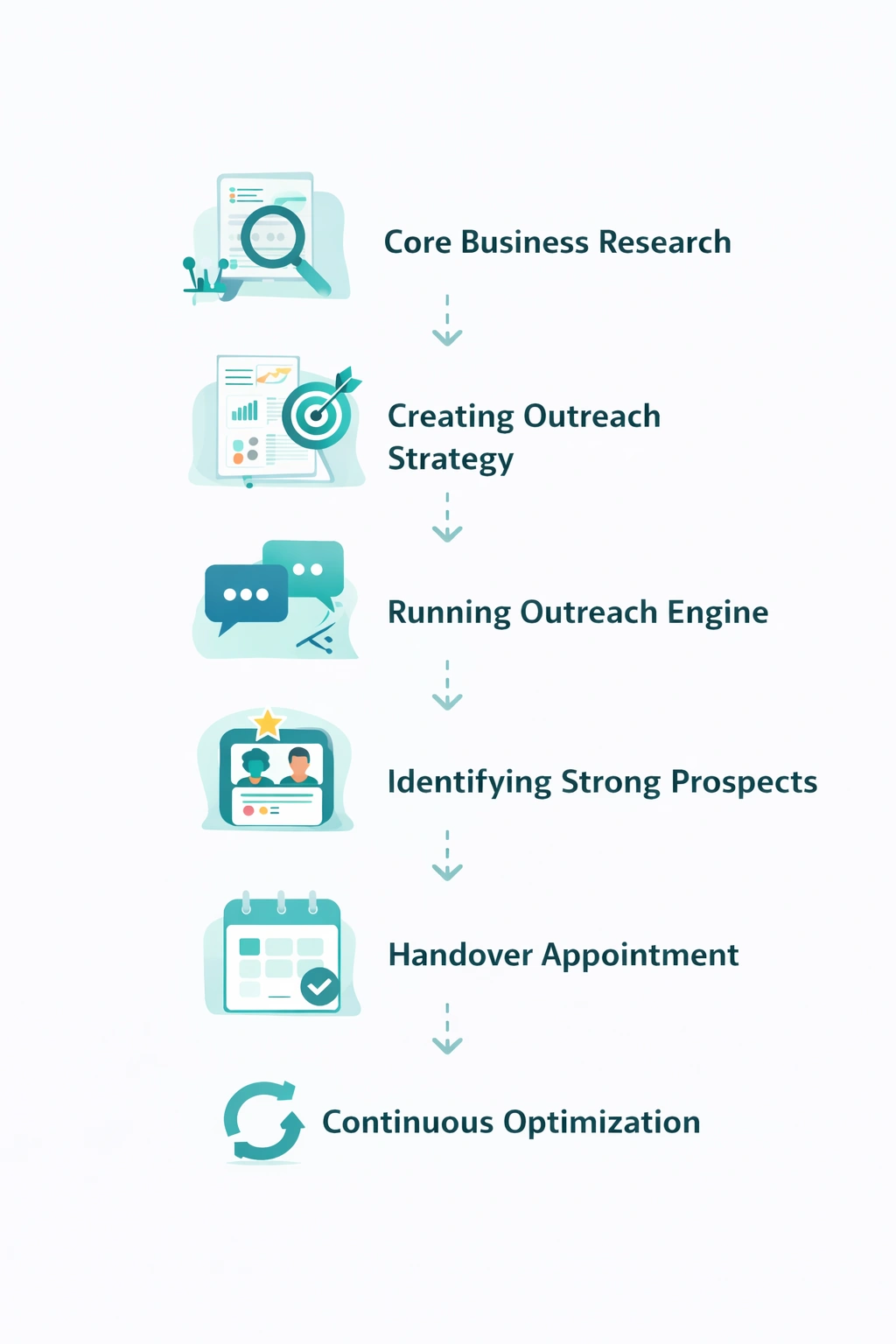
From identifying the right decision-makers to starting meaningful conversations and turning them into qualified appointments... LinkedoJet manages the entire outbound engine for your business.
Next step: turn LinkedIn into a repeatable employer client engine
If you’re done with “we’ll revisit after open enrollment” and random HR replies, the path is simple: qualify fit, route to Benefits/Total Rewards, and work the accounts that are showing timing signals—every week.
LinkedoJet builds and runs that engine for corporate fitness and workplace wellness providers: ICP + segments, Sales Navigator lists, decision-maker matching, AI-assisted personalization, outreach execution, reply handling, lead nurturing, warm lead tracking, dashboards, and ongoing refinement.